Car Hard to Start When Cold? What to Record Before the First Start
Before the first start after a long park, note what the engine actually does. A starter that does not turn or turns slowly, a normal crank that takes longer to start, and an engine that starts then runs rough are different observations. A short OBD2 record can preserve some of the conditions around the event for the next check.
OBD CAN team · Updated
Separate the three starting symptoms
The starter does not turn or turns slowly. Record what you heard and any warning. If available, keep an adapter-voltage trace with that observation. A voltage trace from the adapter covers its supply at the diagnostic port. A technician can test the battery and starting circuit directly.
The engine cranks normally but takes longer to start. Record how long it was parked, whether this was the first attempt and when the engine began running. Save any standard OBD2 codes and the conditions before the attempt.
The engine starts, then runs rough or stalls. Mark when it started and when the symptom began. Keep the first available engine-speed readings after it started, and note any codes that accompanied the symptom.
Capture the readings before cranking
Park in a well-ventilated place and follow the owner's manual for ignition and starting. Before cranking, switch the ignition on with the engine off if the vehicle supports that state. Check whether OBD CAN can communicate. Note the time parked and the outside conditions, including use of an engine heater. Read the supported engine coolant temperature (ECT) and intake air temperature (IAT).
Sensor Data Recording requires sign-in, paid access and a compatible BLE adapter. Select supported ECT, IAT and engine speed (RPM). Start the recording before the attempt if the connection allows it. Record the time of the engine-start attempt separately from the CSV's elapsed time, which begins when recording starts. Keep the App in the foreground and avoid repeating a difficult start just to fill a data gap.
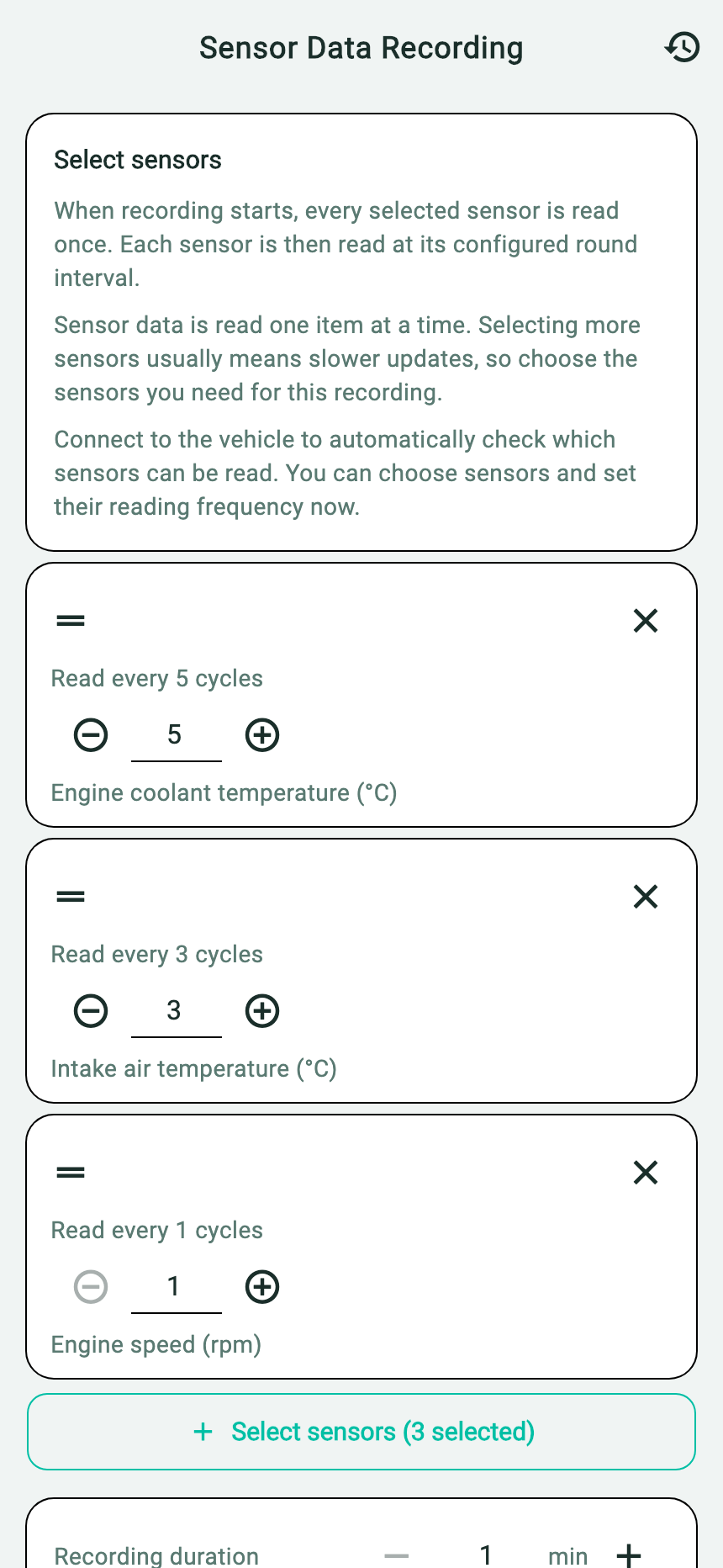
- Use the vehicle's support check before selecting sensors.
- Use coolant temperature, intake air temperature and engine speed if they are available.
Keep gaps visible in the start record
The examples use the same cold-soak starting temperatures. In one recording, the RPM request returns No data near the start. The other recording has valid responses in that part of the window. The App polls the sensors in sequence. Compare the actual elapsed times in the CSV, and leave a missing RPM sample blank. A missing response cannot establish that the starter did not turn.
The RPM value at 3 seconds is blank. The valid samples at 4 and 9 seconds show 190 and 720 rpm.
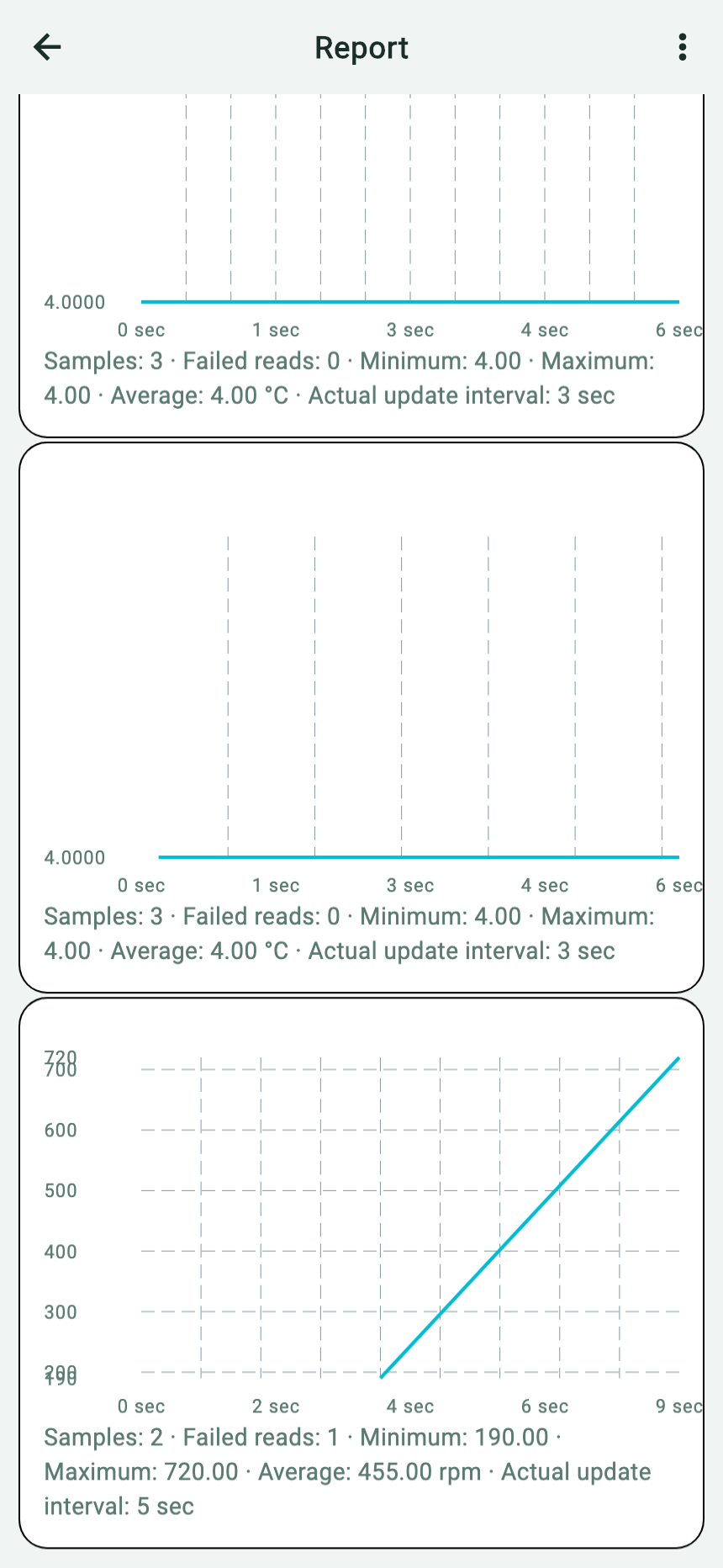
- Use the RPM series and its elapsed time to locate the start window.
- Match the missing request to its No data row in the CSV.
Compare another first start under similar conditions
Compare the same vehicle after a similar time parked and in similar weather. A repeatable temperature difference before starting is a reason to check the vehicle's sensor definitions, location and applicable procedure. If communication drops during cranking, keep the last valid reading and the first one after recovery, plus what you actually heard or saw.
Open History to save the recording and its CSV. Pair it with the code report, vehicle and engine, elapsed times, and symptom note for a technician. If the engine fails to start, follow the owner's manual or seek assistance.
Check the 12 V battery safely, then compare a cold start
If the starter is silent or slow, switch off and use the manual to locate the 12 V battery and permitted owner checks. From a safe position, look for case damage, an obviously loose cable or heavy corrosion. Do not disconnect or touch terminals; stop if access is difficult or the battery is damaged.
Ask a shop to test the battery and starting system using the battery’s actual type and rating. Adapter voltage is diagnostic-port supply, not a battery load test. Replace the battery only when the test and vehicle-specific information support it; use the exact specified type and required registration or reset. This Ford manual example illustrates why; follow your own manual.
After a confirmed repair, compare the next natural first start after similar parking time and weather. In OBD CAN, record supported ECT/IAT before cranking, mark the attempt time, then compare available RPM samples and a fresh code report. Do not repeat a hard start for data; if it will not start or is unsafe, follow the manual or seek help.