P0128 Code: How to Record and Read a Coolant Warm-Up Curve
P0128 means the vehicle reported coolant temperature below its thermostat regulation criterion under the monitor's test conditions. Save the code first, then record engine coolant temperature (ECT) from a cold start if the vehicle can be observed safely. A trace shows the temperature the control module reported over time. The vehicle's service procedure determines how that evidence should be interpreted.
OBD CAN team · Updated
Save the code and note the starting conditions
In OBD2 Diagnosis, read the confirmed, pending and permanent results and keep the saved report before clearing anything. Note any accompanying coolant temperature or sensor circuit code.
Cold-start notes to keep with the CSV
- Record the vehicle and engine, time parked, and first reported ECT. If available, record the outside or intake-air temperature and identify which one.
- Record the engine start and recording start times. The CSV's elapsed time is measured from recording start. Note any delay after starting the engine.
- Record idle time and changes in load. Repeat on the same vehicle at similar starting temperatures and operating conditions when safe.
Set up the phone while parked in a well-ventilated area. If an overheating warning appears or you see steam or a coolant leak, stop the observation and follow the vehicle owner's manual. Keep the cooling system cap closed while the engine is running or hot. Follow the manufacturer's procedure for any road test and keep the driver's attention on driving.
Record the supported coolant temperature signal
Sign in to OBD CAN, connect a compatible BLE adapter and open Sensor Data Recording. Starting a recording requires subscription or lifetime access. In “Select sensors,” choose engine coolant temperature (standard OBD2 PID 05). Check that the connected vehicle supports it. If support cannot be verified, resolve the connection or confirm vehicle coverage before relying on the log.
Use a short sensor list and choose the duration and polling interval before tapping “Start recording.” The interval uses polling cycles, so the CSV is the source for elapsed times. Keep the App in the foreground. Let the planned session finish or tap “Stop and create report.” Open the saved report from History and choose “Export CSV” from the three-dot menu.
Read the curve and its missing sample together
In the example, the reported ECT rises from 18 °C at the start of recording to 67 °C at 180 seconds and 86 °C at 360 seconds. The request at 240 seconds returns “No data.” Leave that value blank when comparing the curve and CSV. There is no measured temperature at that time, and the recorded final value is neither a target temperature nor a pass result.
Compare valid samples at similar times after engine start. Investigate recurring jumps or gaps before judging the warm-up rate.
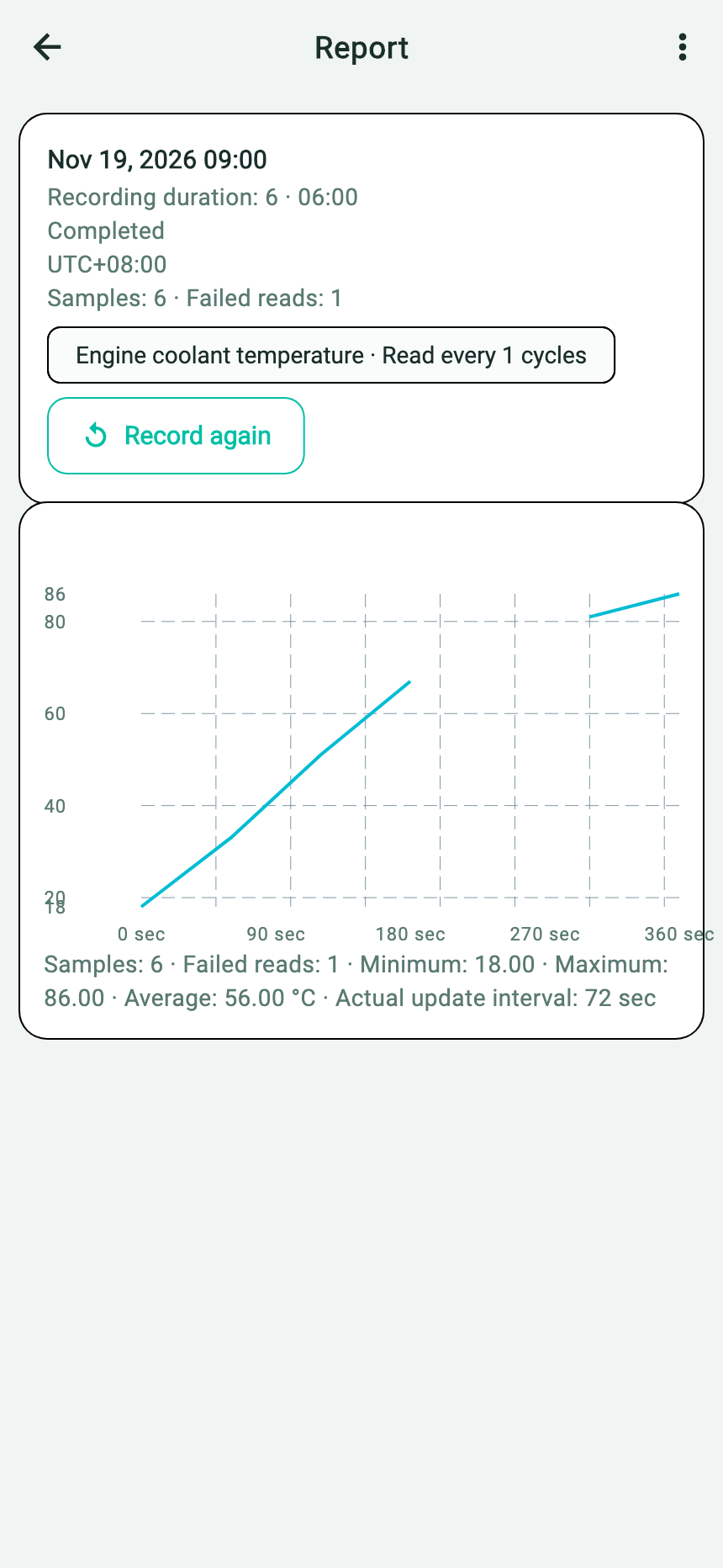
- The report shows the finished session and elapsed recording time.
- The coolant series has six valid readings and one failed request.
- Use the gap in the chart and the CSV's “No data” row to locate the missing request at 240 seconds.
Choose the next check from the evidence
| What the record shows | Useful next step |
|---|---|
| A repeatably slow rise under comparable conditions | Bring both traces and their starting conditions to the technician. Compare against the exact engine's warm-up test and eligibility conditions. |
| Sudden jumps, dropouts or otherwise implausible readings | Keep the original status rows. Ask whether connection, sensor or circuit checks are needed before interpreting the warm-up trend. |
| Temperature rises through the recorded window, but P0128 is still present | Keep its code category and note the conditions of the log. A temperature rise alone cannot show whether the relevant monitor ran or met its criterion. |
Share the saved code report, original CSV and starting conditions together. The manufacturer may use modeled temperature, operating load and other inputs. For instance, GM bulletin 20-NA-167 describes a diagnostic timing issue on specified 2019–2020 Silverado and Sierra 1500 vehicles with the LV3 engine. Check vehicle applicability before using a bulletin to interpret a code.
Ford's 2020–2023 gasoline OBD summary gives a thermostat-monitor example that uses starting coolant and intake-air temperatures, modeled coolant temperature, and time at idle or low load.