Poor gas mileage with no check-engine light: compare fill-ups and OBD data
No check-engine light does not confirm that fuel economy is normal. First check whether tank-to-tank fuel economy has actually changed; then use vehicle data as a separate diagnostic clue. The OBD CAN Fuel Consumption report describes a connected session and its source, method and available inputs. It does not calculate a long-term miles-per-gallon result from gallons dispensed at the pump and odometer miles.
OBD CAN team · Updated
Confirm a change with comparable fill-ups
Use the same full-to-full method over multiple tanks. At each refill, record odometer distance since the previous full fill and the U.S. gallons dispensed to refill the tank. Calculate each interval separately:
U.S. MPG = miles driven since the previous full fill ÷ U.S. gallons added at this fill.
A partial fill, a different pump shutoff, or mixing U.S. and Imperial gallons makes intervals harder to compare. Keep receipts and check the method before deciding that MPG fell. Weather, speed, idling, traffic, hills, cargo, towing, air-conditioning and tire pressure can also change results; compare these conditions rather than ascribing every difference to a vehicle fault. EPA lists these as real-world fuel-economy factors, not as a way to diagnose a particular car.
Read what the App's fuel report actually measures
The Fuel Consumption feature uses an available supported source, such as a direct ECU fuel-rate reading or a calculation from supported airflow data and the configured engine inputs. Its exported session CSV records the source, method, result, fuel type, readings, units and available inputs. At idle the screen can show a rate in L/h; while moving it can show an instantaneous L/100 km value. Those units and values describe that session. They do not represent gallons added at a refill or a verified tank-to-tank U.S. MPG.
To create the report, sign in, connect a compatible BLE adapter, open Fuel Consumption and start the feature while parked. The App performs a precheck, checks the available fuel-type and fuel-rate inputs, and may ask you to confirm fuel type. If an input is rejected, missing or the source is unavailable, the report result must be interpreted with that status. Starting the monitored report is a paid feature. Stop and save the session before using its history or export actions.
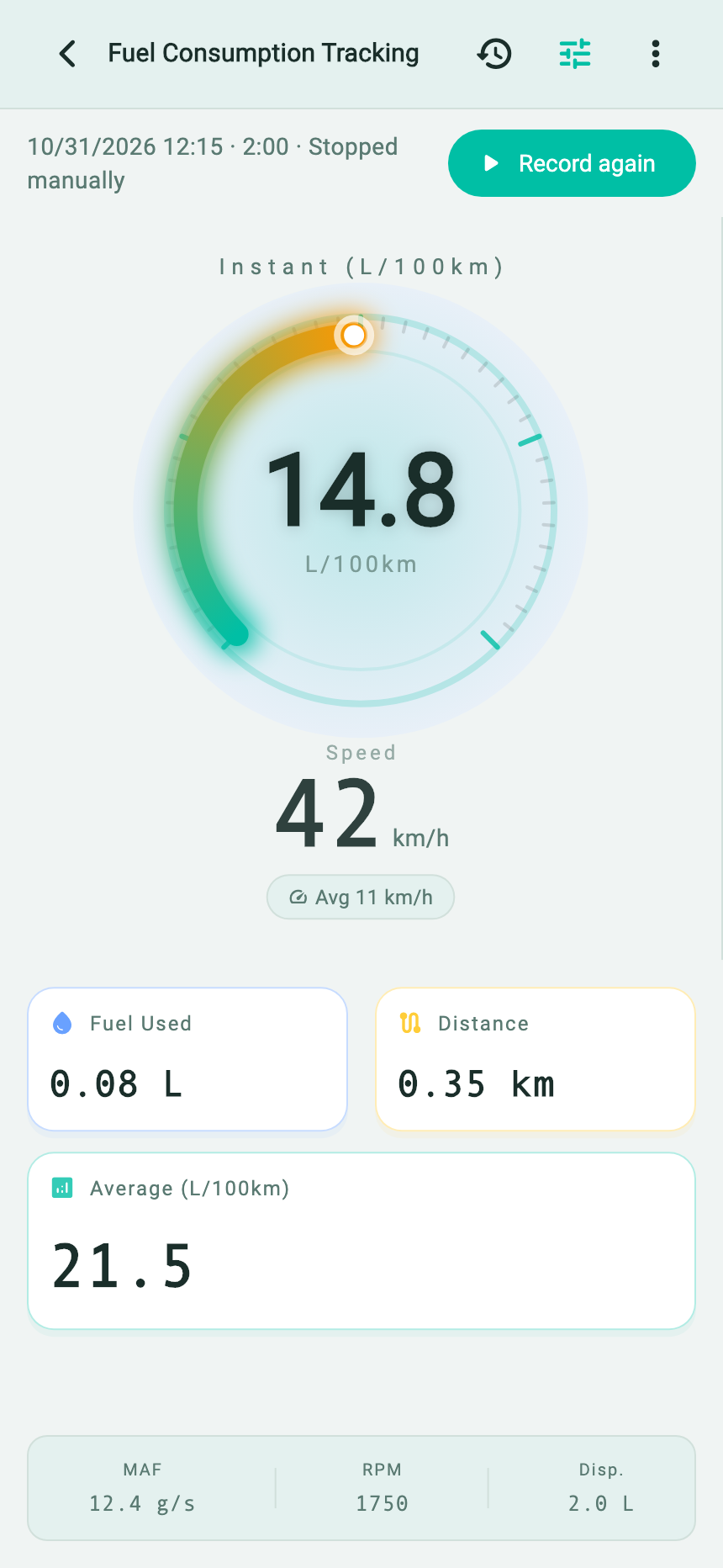
- The saved session’s last observation is 14.8 L/100 km at 42 km/h; the header shows that recording has stopped.
- The session cards separately report average 21.5 L/100 km, 0.08 L used and 0.35 km.
- The lower strip preserves context: MAF 12.4 g/s, engine speed 1750 rpm and configured displacement 2.0 L.
In the underlying CSV, this example records the calculation source as “Direct ECU reading” and the result as “Complete.” The App report screen shows the session readings; the export records the source and method fields that explain where the number came from.
At the first observation (0 seconds), the example engine is idling and the App reports 0.95 L/h, 780 rpm and 2.7 g/s MAF. At 60 seconds it is still idling. At 120 seconds the moving snapshot reports 42 km/h, 1,750 rpm, 6.2 L/h ECU fuel rate and an instantaneous 14.8 L/100 km. The short session summary shows 0.08 L over 0.35 km and an average of 21.5 L/100 km. The average is higher because it accumulates fuel during the idle interval while distance is zero, then divides the total by a very short distance. The 0-second observation sets the integration baseline; fuel before the first valid reading is not reconstructed. This illustrates how to interpret the App's session math, not a normal MPG, trip or vehicle result.
The files below preserve the English App's native clipboard report and session export, rather than recreating either from this article. The clipboard report includes bilingual field labels:
Download the native English App CSV · demonstration data. View the verbatim clipboard report from the English App (some field labels are bilingual).
Use pump MPG and the OBD report as separate evidence
| Evidence you have | What it can establish | Next useful step |
|---|---|---|
| Several comparable full-to-full intervals show lower U.S. MPG | There is a repeatable change in measured fuel use under those recorded conditions. It still does not identify the cause. | Compare route, temperature, idling, load and maintenance history; note any new symptom, then retain relevant OBD codes and reports. |
| The App's session estimate differs from pump MPG | The two methods describe different evidence and time spans. The App report is not an independent pump measurement. | Read its source, calculation method, fuel type, units and result before comparing sessions. Keep receipts and odometer data for tank MPG. |
| Inputs are unavailable, rejected or a report says partial | The session estimate lacks some evidence described by its status; do not fill missing values or compare it as complete. | Check the report's listed inputs and result. Repeat only when a compatible signal and useful operating condition are available. |
The App report's three fixed questions ask whether current idle/driving consumption falls in an expected range, whether intake efficiency looks optimal from available MAF, engine speed and displacement, and what may improve economy based on the metrics. These prompts are generic report questions, not a prediction of an individual's tank MPG or a vehicle-specific diagnosis. In the report menu, choose “Copy AI Prompt Template” to copy the displayed report and its questions. The App does not open a chat or select an AI provider. You can paste it into a service or AI tool you choose, review the output, and add your own pump log and operating context. See the AI report guide for that handoff.
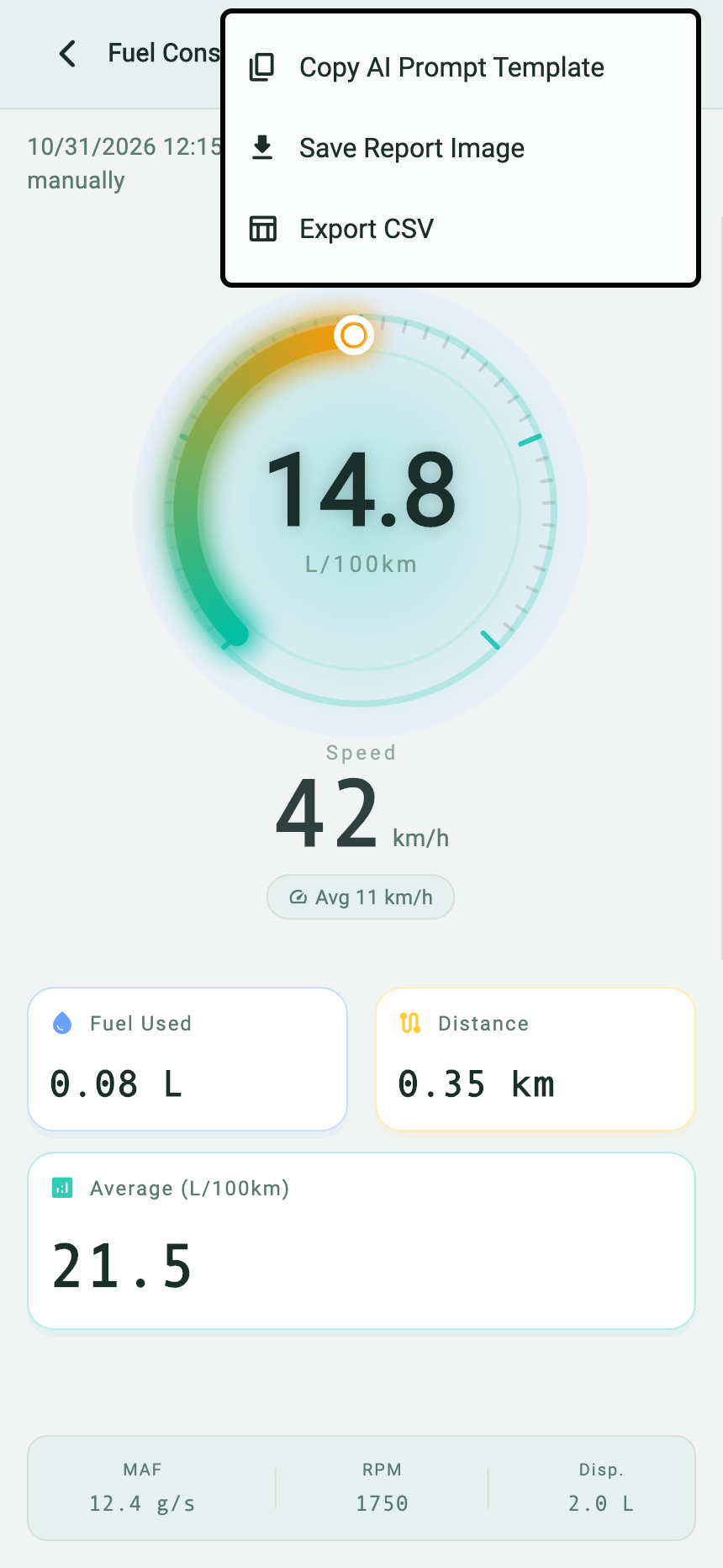
- Choose “Copy AI Prompt Template” to copy this report with the App's three fixed questions.
- “Save Report Image” saves the report as an image for reviewing or sharing.
- “Export CSV” preserves the session rows and source fields for closer inspection. Copying a prompt leaves you to open your chosen AI separately.
Verbatim clipboard report from the English App (some field labels are bilingual)
# 🚗 Fuel Consumption & Engine Data Report

## 瞬时油耗 / Instant Fuel
- 14.8 L/100km

## 运行数据 / Engine Data
- 平均油耗 (Average Fuel): 21.5 L/100km
- Speed (Speed): 42 km/h
- 本次消耗 (Fuel Used): 0.08 L
- 本次里程 (Distance): 0.35 km
- 进气流量 (MAF): 12.4 g/s
- 发动机转速 (RPM): 1750

## 配置参数 / Configuration
- 车辆排量 (Displacement): 2.0 L
- 容积效率 (Volumetric Eff.): 85.0 %

---

Above is the real-time fuel consumption and engine data. Please act as a professional automotive engineer and analyze the current fuel efficiency and engine operating condition.
1. Is the current idle/driving fuel consumption within a normal range?
2. Based on MAF, RPM and Displacement, is the engine intake efficiency optimal?
3. Any suggestions to improve fuel economy based on these metrics?
A missing check-engine light does not rule out a mechanical issue or a problem the available OBD session cannot identify. Retain codes and freeze-frame information before clearing them. If you notice a fuel smell, leak, smoke, overheating, serious loss of power or unsafe handling, stop collecting data and arrange an appropriate inspection. Use the vehicle maker's service information for diagnosis rather than replacing a part from an MPG number or AI suggestion.
Sources and scope
- U.S. EPA fuel-economy label guidance — explains the MPG and gallons-per-distance relationship.
- U.S. EPA: Your Mileage May Vary — describes route, speed, temperature, idling, load and other real-world influences on fuel use.
- OBD CAN Fuel Consumption guide — describes the session estimates and inputs available in this App feature.
EPA guidance describes test and real-world fuel economy. It does not validate a particular OBD estimate, determine why an individual vehicle's MPG changed or supply a repair threshold.