ELM327 connected, but no vehicle data? Check the connection in stages
First identify where you see “connected.” A phone finding an adapter, a Bluetooth link and a vehicle returning a requested value are different observations. In OBD CAN, the settled “Connected” screen comes after initialization and an initial OBD response probe. If that screen is ready but a reading is missing, investigate the particular request and its status before assuming that the ECU never responded.
OBD CAN team · Updated
Start with a safe, compatible connection
Park securely before operating the phone. Follow the vehicle manual for the required ignition state; do not run an engine in an enclosed space. Check that the adapter is seated and powered, enable Bluetooth and grant the permissions requested by the App. OBD CAN uses compatible BLE adapters; a Bluetooth Classic or Wi-Fi adapter does not become compatible because its name contains “ELM327.” A power light or a device name is not proof of vehicle communication.
Use the App’s scan and connection flow. Compatible BLE adapters usually do not need pairing in the phone’s Bluetooth settings; follow the exact adapter’s instructions rather than a generic pairing PIN tutorial. Close other diagnostic apps and check whether another phone is holding the adapter connection. Change one condition at a time so that the next result is useful.
Find the last stage supported by evidence
These stages explain the connection path; they are not four separate status badges in the App. A general connection error can cover several stages. Keep its exact wording and timing rather than assigning a cause from the word “connected” alone.
| What you observe | What it establishes | Next useful check |
|---|---|---|
| The adapter does not appear in the App scan. | Discovery has not succeeded; vehicle PID support has not been tested. | Check BLE compatibility, power, Bluetooth state, requested permissions and another active connection. |
| The device appears, but connection or initialization fails. | Discovery worked. The failure may still involve the BLE service, command exchange or initial vehicle response. | Save the exact error, ignition state and failure time. Do not label it an ECU fault from discovery alone. |
| The ready screen says “Connected,” but one value is missing. | Initialization accepted an initial OBD response. This does not establish support for every PID or module. | Finish the support check, note the requested parameter and distinguish unavailable support from a failed read. |
| A current value returns, then the link drops or stops refreshing. | That request worked at that time; the connection or later requests need separate evidence. | Record the last working value, time and disconnect/reconnection message before retrying. |
Read “Connected” and Auto protocol together
OBD CAN initializes the ELM command channel and looks for an expected initial OBD response, using engine speed or the supported-PID query as probes. This is a limited communication check, not a full inspection of the vehicle. The App can then remain connected even when VIN lookup fails or the protocol-number lookup cannot identify a number. A missing VIN and Auto showing “--” are therefore not sufficient evidence of no ECU response.
The screenshots below are captures of actual English App components using a simulated, initialized connection state. They demonstrate how to interpret the controls, not a real vehicle failure or a repaired connection. Vehicle coverage and available parameters must be checked in the actual session.
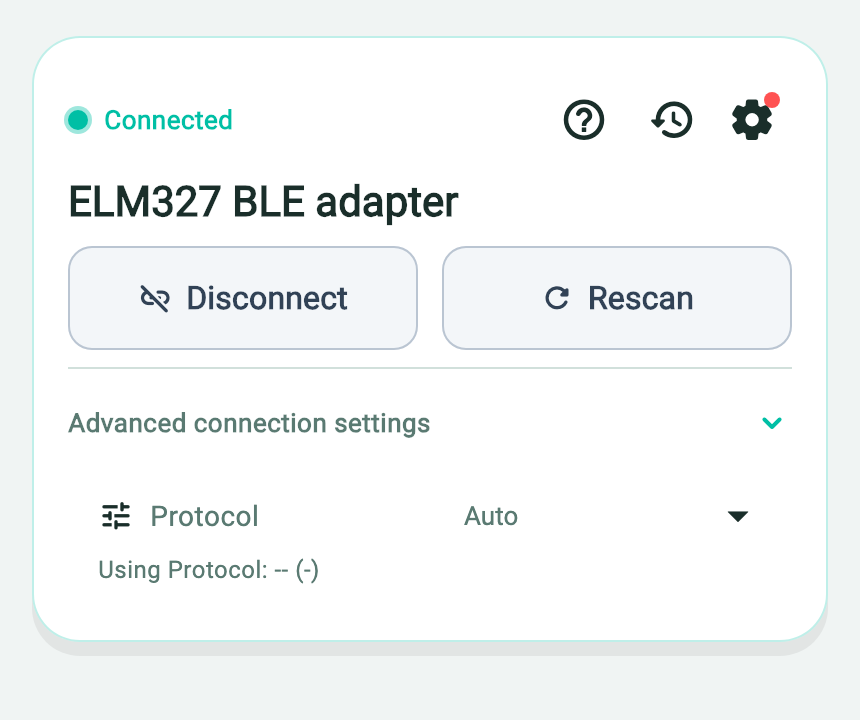
- The settled Connected state follows initialization and an initial OBD response probe.
- Auto is the selected protocol setting, not a detected protocol number.
- Using Protocol: -- (-) means the protocol number was not identified; it does not prove no ECU response.
Leave protocol selection on Auto unless reliable information for the exact vehicle and adapter calls for a specific protocol. Selecting a manual protocol changes a setting; it does not prove that the vehicle uses it. Do not cycle through choices until a reassuring label appears. If a known setting was changed, record it and return to the documented configuration before a controlled retry.
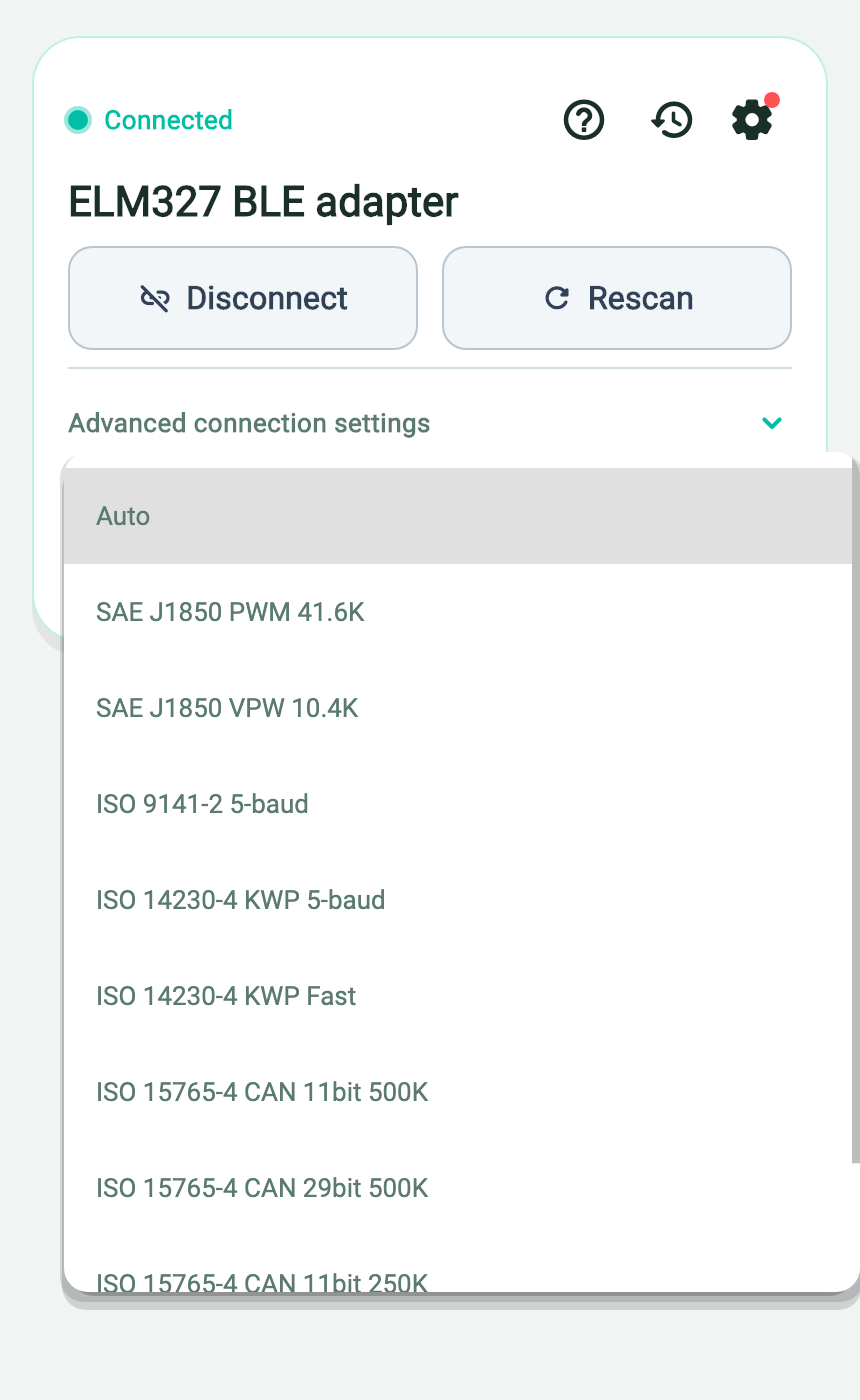
- The menu contains configuration choices; opening it does not test vehicle compatibility.
- Keep Auto unless the correct vehicle and adapter information requires a known manual setting.
Separate a failed request from an unsupported parameter
Wait for the vehicle support check in Live Data. A completed support list describes parameters advertised as available; a later request can still time out, fail to decode or lose its connection. One unsuccessful read does not establish “unsupported.” Conversely, one working RPM value does not establish access to every ECU or manufacturer-specific function. Keep the parameter name, units, request status and whether other current readings work.
If an adapter response includes “NO DATA,” treat it as no matching response within that request’s conditions, not as a measured zero or a clean bill of health. The original ELM327 documentation also distinguishes inability to establish a protocol from a missing response to an individual request. Adapter implementations vary; preserve the actual message and use the correct vehicle and adapter documentation instead of turning it into a failed-part diagnosis.
Retry once with a clear record
Before retrying, note the error and the last stage that worked. Check power, permissions, the manual’s ignition state and competing connections. If automatic recovery is running, use “Cancel reconnection” when you need to stop it; an in-progress connection can show “Cancel connection.” Once settled, use Disconnect or Rescan as appropriate and make one controlled connection attempt. Repeatedly cycling the ignition or changing several settings at once makes the evidence harder to interpret.
If it still fails, stop guessing and collect the evidence below. A technician may need a known-compatible communication test and vehicle-specific service information. Do not bridge connector pins, remove fuses, probe electrical circuits or clear codes merely to make a connection error disappear.
Give support the connection evidence, not just “it connects”
- Vehicle make, model, year and engine; adapter exact model and BLE variant, with firmware if known.
- Phone model, operating-system version, App version and ignition state during the attempt.
- Exact screen message and failure time; whether discovery, initialization or any current reading worked.
- Selected protocol, the particular missing parameter and any changes made before the controlled retry.
For communication evidence in OBD CAN, open Settings → Diagnostic Logs and enable logging before reproducing the issue. Logs are off by default. When support asks for them, add the issue description and use Submit Logs on that page. Review what you are sending. This is the ordinary in-App submission flow; sensor CSVs and saved diagnostic reports are different records and may not explain a failed connection.
Continue with the right guide
For adapter and account questions, see connection help. Once communication works, use Live Data to check current supported readings or OBD2 Diagnostics to read diagnostic results.
Technical source and scope
ELM Electronics: original ELM327 datasheet — explains original command responses and protocol behavior. It does not certify every adapter sold under the ELM327 name or provide vehicle-specific repair instructions.