EVAP Monitor Not Ready: Read the OBD2 Status
An EVAP monitor marked not ready has not completed its self-check, so the monitor has not yet produced a completed readiness result. That status alone does not diagnose a vapor leak or a failed part. Start by checking that EVAP is supported, read the since-clear and current-cycle status separately, save the reported counters and check for EVAP-related DTCs. Then use the vehicle maker’s conditions for that exact model; there is no universal EVAP drive cycle.
OBD CAN team · Updated
Read support, readiness and time period as separate fields
Supported means the vehicle reports that this monitor applies. Not supported means this response does not report the monitor as applicable; it is not the same as a failed test. For a supported monitor, ready means its onboard test completed, while not ready leaves the latest completed test result unavailable. The U.S. EPA describes readiness in this same I/M testing context: a not-ready monitor has not completed testing, so its system state is undetermined. That does not declare the vehicle repaired or defective.
OBD CAN’s Monitor Status reads standard monitor-status and trip-counter PIDs when the ECU supplies them. The page has separate cards titled Monitor status since DTCs cleared and Monitor status this drive cycle; each report repeats the period on its Mode line. Those are distinct reporting periods. Read the period beside a status before comparing it; do not assume one card duplicates the other.
Related counters can add context: distance driven with the MIL on (PID 0x21), warm-up count since codes were cleared (PID 0x30), and distance since codes were cleared (PID 0x31). These are values the ECU reports, not a countdown that guarantees when EVAP will become ready. A zero or missing counter must not be substituted for a value the screen does not provide.
Capture the current EVAP evidence before changing it
- Park the vehicle and connect a compatible BLE OBD2 adapter. In OBD CAN, sign in, open Monitor Status and start or refresh the read. This feature requires sign-in and paid membership.
- Find the Evaporative system row and record its support and readiness for each displayed period. Save a screenshot or use the report copy menu after results load.
- Read the MIL and trip counters the ECU actually supplied. In the same session, check confirmed, pending and permanent DTC categories. Record exact EVAP-related codes and their category; a code changes the task from waiting for readiness to following that code’s diagnostic procedure.
- Note whether codes were recently cleared or the battery disconnected, and when the read was taken. Then check the manufacturer’s service information for the exact year, model, engine and market before following any monitor completion instructions.
A recent reset can explain why readiness has not yet been restored, but the screen cannot tell you that this was the cause. Fuel-level windows, temperature ranges, soak periods, speed and load conditions vary with vehicle design. Follow only a verified service procedure; avoid online drive-cycle instructions that do not match the vehicle.
See how the App labels the two readiness periods
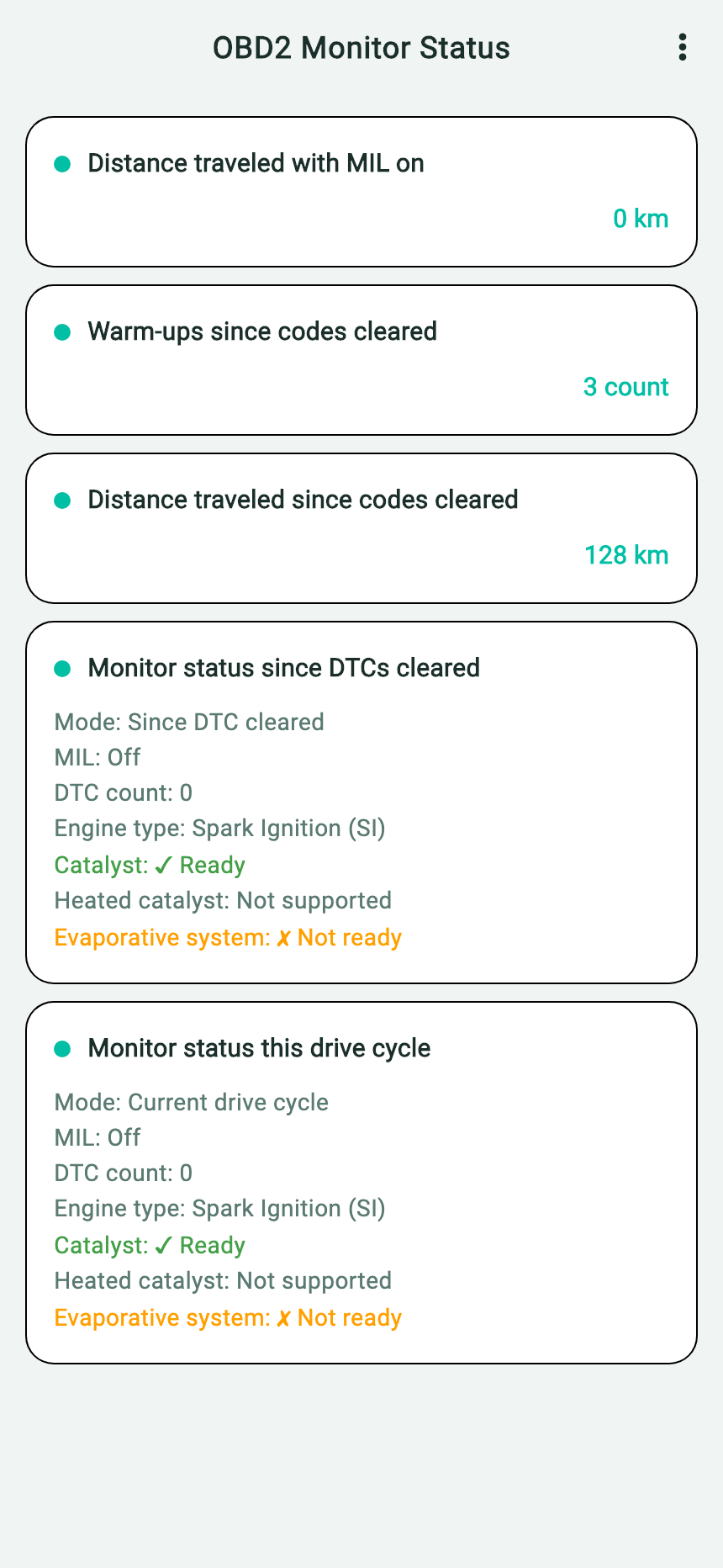
- EVAP: the example reports this monitor as supported and not ready; this is not a leak diagnosis.
- Since DTC Cleared: the example reports 128 km since codes were cleared, three warm-ups, and 0 km traveled with the MIL on.
- Current Drive Cycle: keep the second view separate from the since-clear status; the ECU may report different values or omit fields.
- Heated catalyst: it is an independent monitor; its unsupported example state does not change EVAP applicability.
With results displayed, tap ⋮ More Options, then select Copy AI Prompt Template. The copied English report contains the returned monitor fields followed by three fixed questions about monitor status and inspection context. Those are general Monitor Status prompts, not an EVAP-specific AI diagnosis. The excerpt below is the App’s actual clipboard text for this example; retain the units and statuses in your own report.
# OBD2 Monitor Status

Distance traveled with MIL on: 0 km

Warm-ups since codes cleared: 3 count

Distance traveled since codes cleared: 128 km

## Monitor status since DTCs cleared
- Mode: Since DTC cleared
- MIL: Off
- DTC count: 0
- Engine type: Spark Ignition (SI)
- Catalyst: ✓ Ready
- Heated catalyst: Not supported
- Evaporative system: ✗ Not ready

## Monitor status this drive cycle
- Mode: Current drive cycle
- MIL: Off
- DTC count: 0
- Engine type: Spark Ignition (SI)
- Catalyst: ✓ Ready
- Heated catalyst: Not supported
- Evaporative system: ✗ Not ready

---

Based on the OBD2 monitor status data above, please analyze:
1. Are the readiness statuses of each monitoring system normal? What do the not-ready and not-supported items mean?
2. What do the MIL distance, distance since codes cleared, and warm-up count indicate?
3. Based on all the monitor status data, can this vehicle pass the emissions inspection? What should I be aware of?
Download the exact English App report and built-in questions. To ask about an EVAP-specific concern, paste the report into your usual AI and add your own follow-up after checking the vehicle details. See how to use a copied OBD CAN report with AI. The report does not contain a dedicated EVAP prompt or an inspection verdict.
Choose the next test from the combined result
| EVAP status | Code / warning evidence | What to do next |
|---|---|---|
| Supported; not ready in the applicable view | No related DTC reported; MIL status and communication are known | Keep the recorded status and reset history. Check the vehicle-specific monitor conditions; rescan after those conditions are safely met. |
| Not ready continues, or the screen does not show a reliable supported status | No clear completed result, or the communication response is missing | Do not label it ready or failed. Verify support and communication with a compatible tool or technician; consult exact vehicle service information. |
| Any readiness state | EVAP-related DTC is present, the MIL is on, or a fuel-vapor symptom appears | Save the exact code and category and follow that vehicle’s diagnostic procedure. Do not replace a component from monitor status alone. |
| Not supported | Applicability has not been established | Check engine and emissions configuration for the exact vehicle. An unsupported response is neither an EVAP pass nor a failed EVAP test. |
OBD CAN’s separate Inspection Precheck applies its own displayed rule and supported-monitor set; Monitor Status does not apply local inspection criteria. The EPA guidance describes general U.S. inspection practice, while each state and locality sets its own program. Confirm local rules with the responsible agency or inspection station.
Primary references and limits
- U.S. EPA, Performing Onboard Diagnostic System Checks as Part of a Vehicle Inspection and Maintenance Program: general readiness meaning and manufacturer-specific enabling conditions; technical background, not a universal repair or drive-cycle recipe.
- U.S. EPA, Vehicle Emissions Inspection and Maintenance Policy and Technical Guidance: state and local programs set inspection requirements.
Read the OBD CAN Monitor Status guide for its reported fields and access requirements, or OBD2 trouble-code diagnosis for the code categories. For vehicle-specific module scans, see UDS diagnostics.