Check Engine Light On but No Codes: Verify the Scan
If the check engine light stays on after startup but your scan lists no codes, check whether the engine computer reports the light as on and whether it reports any stored codes. Compare those readings with the dashboard and the code screen before clearing anything. If the light flashes or the vehicle shakes, loses power or overheats, follow the owner’s manual and arrange prompt assistance.
OBD CAN team · Updated
Identify the warning before scanning
Identify the symbol and message in the owner’s manual. A check-engine light, oil-pressure warning, temperature warning, maintenance reminder and hybrid-system warning call for different responses. Note whether the MIL is steady or flashing, and whether it appeared at startup or during a trip. If it is flashing, or the vehicle is shaking, losing power, overheating or otherwise unsafe, follow the vehicle’s instructions and arrange prompt assistance. Do not keep driving just to collect scan data.
The malfunction indicator lamp (MIL) can light briefly before the engine starts as part of its lamp check. Compare readings for the warning that remains on after startup.
Compare the dashboard light with Monitor Status
- Park safely, apply the parking brake and follow the vehicle and adapter instructions for ignition state. Note whether the dashboard light stays on after startup and whether it is steady or flashing.
- In OBD CAN, sign in and connect a compatible BLE OBD2 adapter. Open Monitor Status under System Check and tap Start. Monitor Status requires a paid membership and a vehicle connection that can return the requested data.
- Under Since DTC cleared (Mode 01 PID 01), record MIL and DTC count. MIL reports whether the responding control unit is commanding the warning light on. DTC count is the number of diagnostic trouble codes the unit reports in that response. Record both alongside what you saw on the dashboard.
Get OBD CAN for iOS or Android
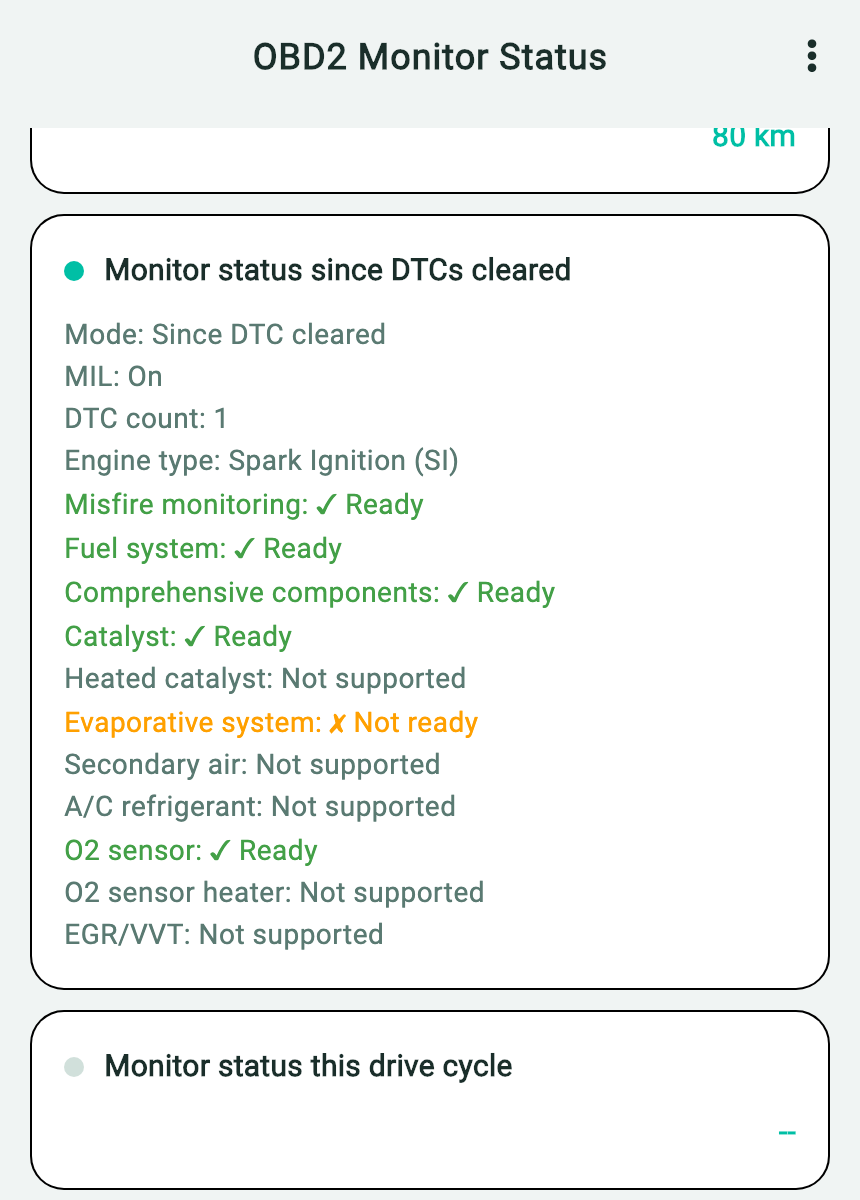
- Since DTC cleared identifies the Mode 01 PID 01 response used for this check.
- MIL: On means the responding unit reports that it is commanding the warning light on.
- DTC count: 1 is the count in that response. Read the code list separately for the actual code.
When Monitor Status returns data, use More Options → Copy AI Prompt Template to save the values as text. The copied report includes built-in questions. Add the dashboard observation and the time of the check separately.
Download the English Monitor Status example copied from OBD CAN
What to do with each reading
| What you see with an empty code list | What to do next |
|---|---|
| MIL: On or a DTC count above zero | Save Monitor Status and the empty code result. Ask a technician with a compatible scanner to verify which control units answered the code requests and which code categories were read. |
| MIL: Off and DTC count: 0, while the same warning is still visible after startup | Recheck the exact symbol and record the dashboard and scan results under the same ignition conditions. If the warning remains or returns, have the mismatch checked. |
| The Since DTC cleared result is missing, or the scan stopped before returning it | Record the missing result and any error. Check the vehicle instructions and adapter connection, then retry once while parked if safe. If you still cannot get a dependable read, use a known-compatible tool or ask a technician to verify the connection. |
A valid Monitor Status response confirms that this request received an answer. Coverage for code reads and other modules still needs to be checked. If Monitor Status is unavailable in your setup, use a compatible scanner that displays the ECU-reported MIL status and DTC count.
Check why an ELM327 adapter connects but the vehicle does not respond
What OBD CAN checks on the standard DTC screen
Open OBD2 Diagnosis and let the standard code read finish. OBD CAN requests these three groups in sequence.
- Confirmed (Mode 03): codes the vehicle reports in its confirmed category.
- Pending (Mode 07): reported results that have not necessarily met the vehicle’s confirmation criteria.
- Permanent (Mode 0A): emissions-related codes retained by the vehicle until its own monitor verifies the condition has been resolved.
The DTC page displays “No DTC found” when the three returned code lists are empty. It does not display a separate confirmation that each Mode 03, 07 and 0A request received a valid, complete response. The underlying read attempts those modes in sequence and saves an interruption flag, but an empty screen alone cannot establish communication quality. “NO DATA,” a no-response message, an interruption or a dropped adapter connection is not a clean bill of health.
If a code appears later, save its exact code and category. Warnings from ABS, restraint or other systems may require a vehicle-specific tool.
Save the empty code result from History
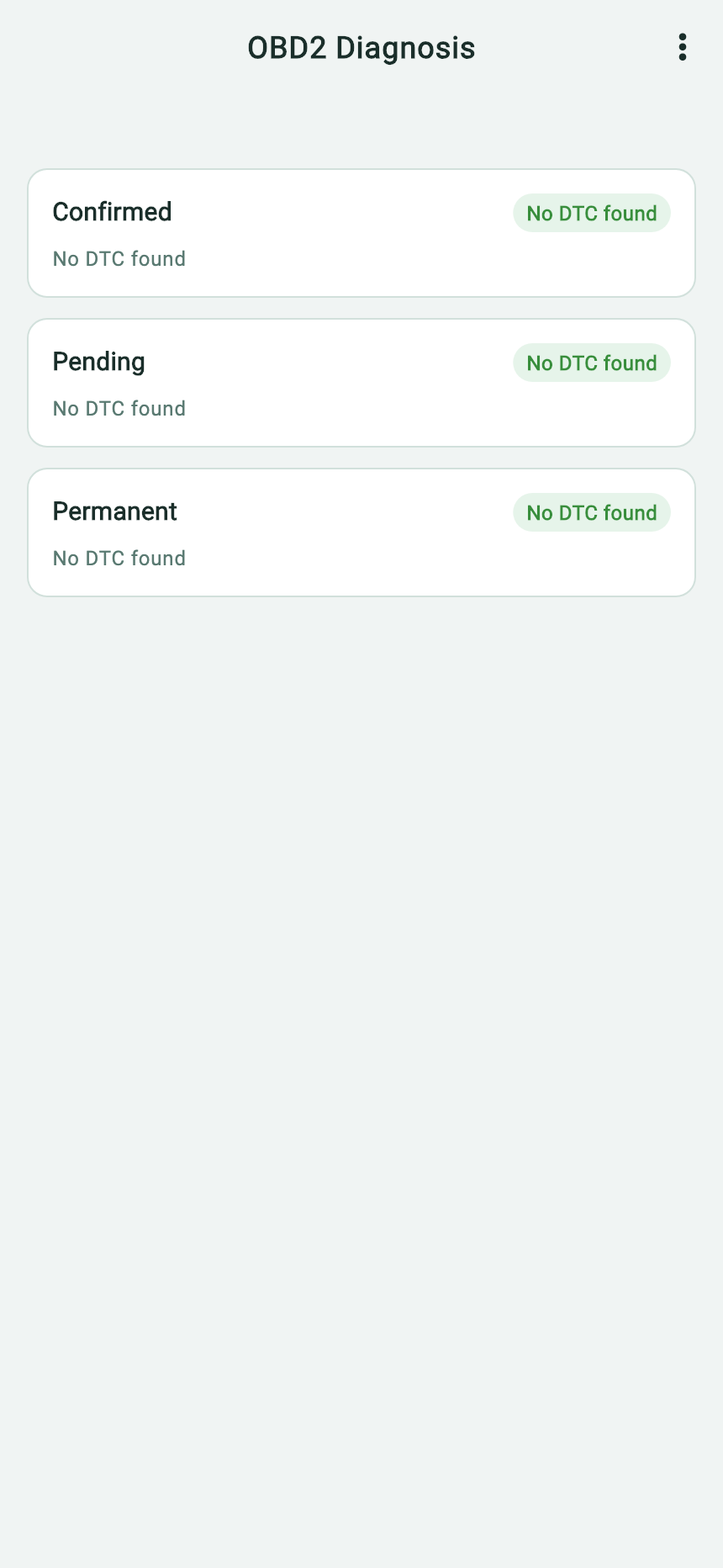
- Confirmed and Pending each show “No DTC found” in this saved report.
- The Permanent category also lists “No DTC found”; it is separate from the other two groups.
- More Options opens the copy and export actions for this saved report.
The saved code report shown here is a separate example from the Monitor Status screenshot above.
A new live DTC result shows the more-options menu only when one or more codes are present. A saved historical DTC page can expose it even if all three lists are empty, as in this example. From that page, tap “⋮ More Options”, select “Copy AI Prompt Template”, then paste the copied text into the AI service you choose. The app supplies three code categories and its general DTC questions; you supply the lamp behavior, vehicle details and follow-up relevant to your case. Review any identifying information before you send it outside the app.
If no History entry was saved, keep a screenshot or note of the live result and any error.
View the English example copied from History
# 🚗 OBD2 Vehicle Diagnostic Report

## Confirmed DTCs — 0
None

## Pending DTCs — 0
None

## Permanent DTCs — 0
None

---

Based on the above OBD2 diagnostic report, please help me analyze:
1. What does each fault code mean and what are the possible causes?
2. Which faults are the most urgent and need immediate attention?
3. Are there any relationships or correlations between these fault codes?
4. What are the recommended repair solutions and estimated costs?
5. Do these faults affect driving safety? Can I continue driving?
Download the exact English App report and built-in questions
What to share with a technician
- Vehicle year, make, model, engine and odometer reading.
- The exact warning symbol and whether it was steady or flashing, when it appeared and any symptoms you noticed.
- The timestamped code result and Monitor Status readings, any read error, and any recent battery work or code clearing you know about.
Keep the original readings before using Clear DTCs. Clearing can remove diagnostic context and reset readiness monitors.
Primary references and scope
- U.S. EPA, Performing Onboard Diagnostic System Checks
- OBD CAN Monitor Status guide
- OBD CAN vehicle-specific UDS diagnostics guide
The U.S. EPA guidance distinguishes the dashboard lamp from the command reported by the control unit in Mode 01 PID 01. For an emissions inspection, check the official rules for your area.