P0172 and P0175: How to Read Negative Fuel Trim Before Clearing Codes
P0172 reports a rich condition on Bank 1. P0175 reports it on Bank 2. Negative fuel trim means the engine computer is reducing fuel relative to its base calculation. Save the code first, then check whether the correction repeats on the same bank, appears on both banks, or occurs only briefly. Those patterns help you choose what evidence to collect next.
OBD CAN team · Updated
Save the code, bank and status
In OBD CAN, sign in, connect a compatible BLE adapter and open OBD2 Diagnosis. Save the report in History before clearing anything. Keep the code's Confirmed, Pending or Permanent category and any companion codes. Note when the symptom happened. A log made today may show different conditions from those that set the code.
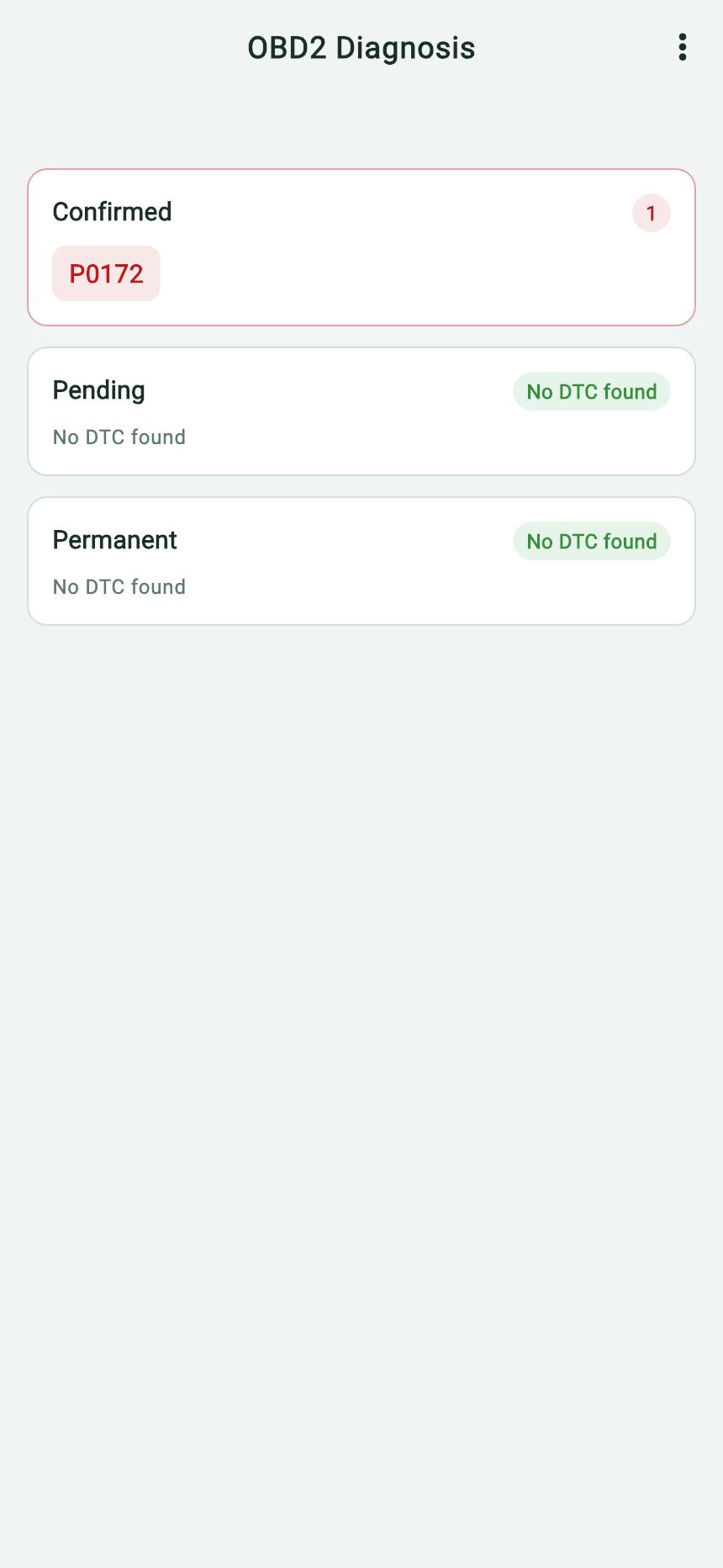
- Check which category contains the code.
- P0172 points to Bank 1. Read the available trim on each bank before comparing.
Compare the same measurements under stable conditions
With the vehicle safely parked in a well-ventilated area, check Fuel System Status in Live Data when supported. Compare fuel trims after the engine is warm and closed loop is confirmed. Note coolant temperature, engine speed, load and any change in conditions. Keep transient readings, such as a brief correction during a change in load, separate from a stable comparison.
Open Sensor Data Recording and select supported short-term fuel trim (STFT), long-term fuel trim (LTFT) and engine speed. Select the second bank only if the vehicle has one and its readings are available. The recording feature requires paid access. After the recording, open its report in History and choose Export CSV from the three-dot menu.
Compare STFT with STFT and LTFT with LTFT across banks in the same stable window. Compare each bank with itself if the condition changes. Check the individual CSV timestamps because the App reads the sensors in sequence. Leave a missing reading blank. Use the exact vehicle's service information for test conditions and limits.
Read the chart with the CSV
In the demonstration, Bank 1 STFT is −18% at idle and −17% in the later window. Bank 2 STFT is −16% and −15%. The negative correction persists in both banks across the sampled conditions. The OBD2 report contains only P0172. Keep the Bank 2 reading as an observation and use the code report to verify whether P0175 was present.
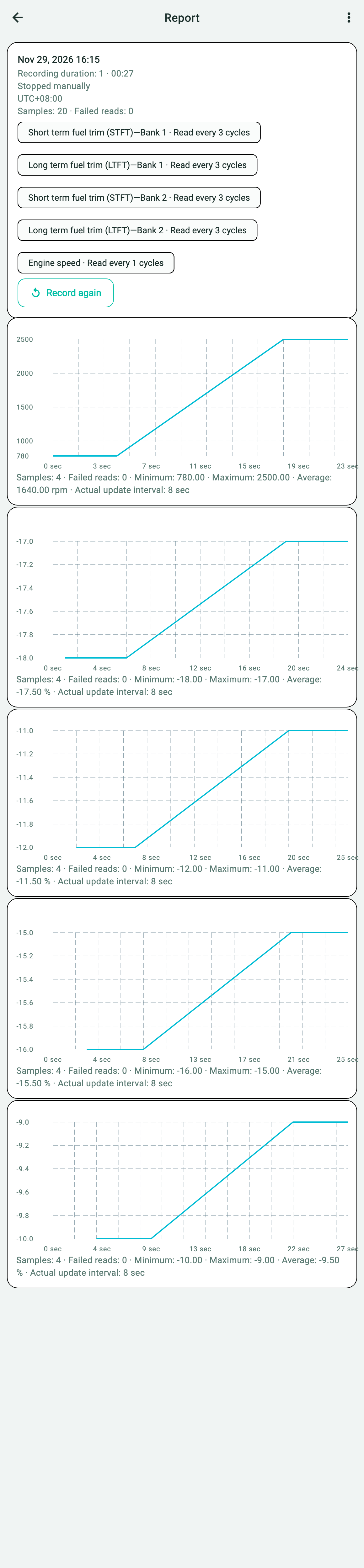
- Engine speed separates the idle readings from the later window.
- The visible trim is Bank 1 STFT. Open the full chart or use the CSV for all four trim measurements.
There are no samples between 9 and 18 seconds. The chart draws a connecting line across that gap.
Decide what to record next
One bank repeatedly shows more negative correction. Verify the bank label and save both banks under the same conditions. Start the service-information review with the reported bank.
Both banks show a similar sustained correction. Keep the shared operating conditions and any related codes. Ask which vehicle-specific test can check inputs or systems common to both banks.
Only a brief correction appears, or readings are missing. Note the exact condition and keep the missing status. Check reproducibility and supported signals before drawing a conclusion from that log.
Bring the original code report, CSV and symptom note together. Depending on the vehicle, a technician may need to compare the measured data with tests of airflow, fuel pressure or injector operation.
Check recent changes before testing fuel parts
Keep the report and note whether the rich code affects one bank or both. With the engine off and cool, check the correct air filter is seated, the airbox is closed and recently disturbed intake connectors are attached. If symptoms began after refueling, verify fuel grade against the owner’s manual. Correct clear assembly issues by the manual; do not replace parts from trim alone.
A one-bank result calls for that bank’s vehicle-specific procedure; similar correction on both banks calls for checking shared systems. Fuel-pressure, injector, purge and sensor tests may need gauges or pressure handling. Follow OEM instructions or use a qualified shop; do not open fuel lines or guess at parts.
After correction, use OBD CAN to record the same closed-loop state, load and speed range. Compare supported STFT and LTFT for each bank separately, with code status. If trim moves toward specification and no code returns after the monitor runs, record it. Persistent differences, returning codes or missing readings call for the matching vehicle-specific test, not a pass assumption.