P0171 and P0174: Compare positive fuel trims at idle
Start with Bank 1 for P0171 and Bank 2 for P0174. If both codes appear, keep their statuses separate and compare the two banks in the same operating condition. If you found positive fuel trims at idle without a code, start with the bank that showed the correction. A positive trim means the control system is adding fuel relative to its base calculation. Identifying the cause takes more evidence than a code or a single percentage.
OBD CAN team · Updated
Use the lean code to choose a bank
P0171 indicates a system-lean result for Bank 1. P0174 indicates the corresponding result for Bank 2. First record the code, its status, and any accompanying codes. A code reflects a condition reported by the vehicle computer. It tells you which bank to examine. A current fuel-trim log describes the conditions you record now, which may differ from when the code was set.
Sign in and connect a compatible BLE adapter. Open OBD2 Diagnosis and run the read. In OBD CAN, standard OBD2 code reading is free after sign-in, and the App attempts to save the diagnostic result in History. Check that the report is there before clearing codes or resetting learned values.
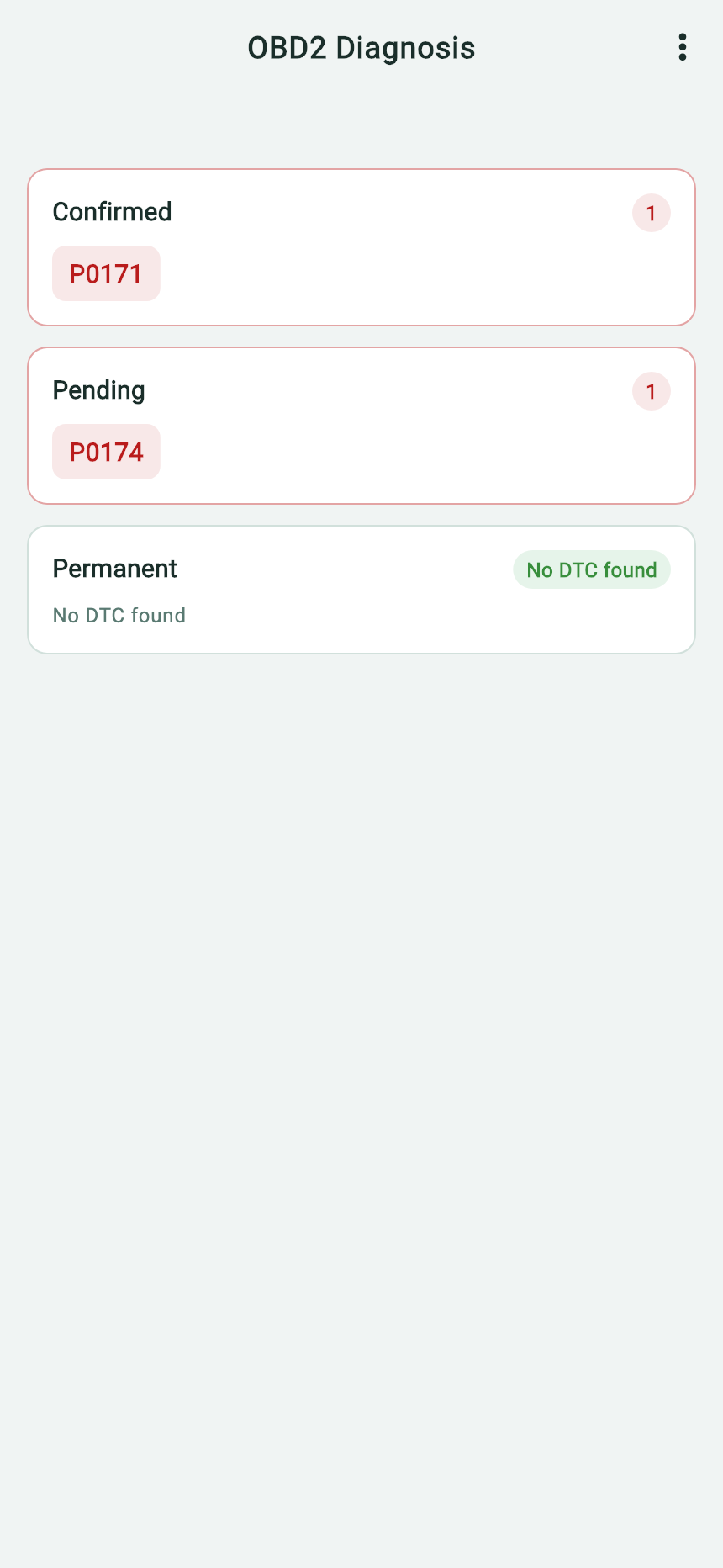
- P0171 appears under Confirmed. Start with Bank 1.
- P0174 appears under Pending. Keep that status visible when you check Bank 2.
- The Permanent list is empty in this report.
Download the original English App report · demonstration data
Make a same-bank comparison
Short-term fuel trim (STFT) changes in response to current feedback. Long-term fuel trim (LTFT) represents a more gradual learned correction. Standard OBD2 assigns separate PIDs for Bank 1 and Bank 2: PIDs 06/07 are Bank 1 short-term/long-term trim, while 08/09 are the corresponding Bank 2 values. Engine speed is a separate PID, not a bank-specific fuel-trim reading. A vehicle may not support every item, and a missing PID is not zero. OBD CAN Sensor Data Recording can show only parameters available in its support check for the connected vehicle.
Make two comparisons. To compare banks, use the same stable window and compare the same measurement on each bank: STFT with STFT, LTFT with LTFT. To see whether a correction changes with conditions, compare each bank with itself across two documented windows. If Bank 2 is absent on the engine, restrict the comparison to Bank 1. If the vehicle has Bank 2 but the reading is unavailable, keep the status in the record and check the vehicle's supported parameters before interpreting the difference.
Some vehicle-specific service procedures consider short and long trim together. Add values only from the same bank and window if the applicable procedure calls for it. The sums in the example illustrate how to compare the recorded windows. Use the limits and test conditions specified for the exact vehicle.
Select readings, then compare the two windows
Open Sensor Data Recording from the App's connection screen. After the support check, select “Short term fuel trim (STFT)—Bank 1,” “Long term fuel trim (LTFT)—Bank 1,” and “Engine speed” only if the connected vehicle lists those sensors. A vehicle may expose just one bank or neither trim PID. Sensor recording requires sign-in and paid membership. Choose the interval and duration, then start the session while the vehicle is safely stationary.
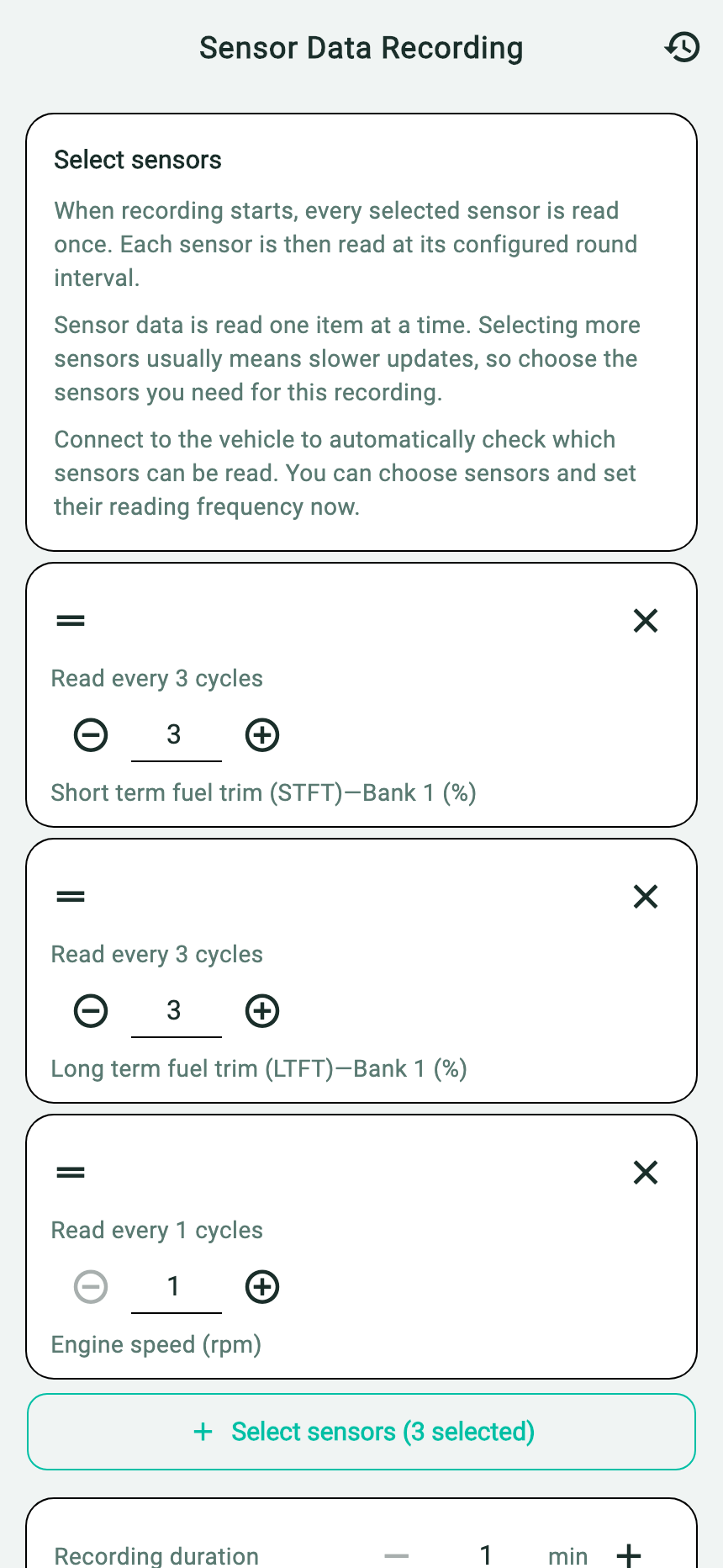
- The two selected fuel-trim sensors are both Bank 1; engine speed is separate.
- Use the support check to confirm available signals before recording.
- A short sensor list helps preserve useful request frequency; each sensor is polled sequentially.
The saved demonstration compares warm idle at 780 rpm (STFT +12%, LTFT +14%) with a separate 2,500-rpm window (STFT +2%, LTFT +6%). The same-bank sums are +26% and +8%. The window names below identify rows in the demonstration CSV. Use the 2,500-rpm values to practice reading the chart. Start your own record at normal warm idle and let the vehicle's service procedure guide any further testing.
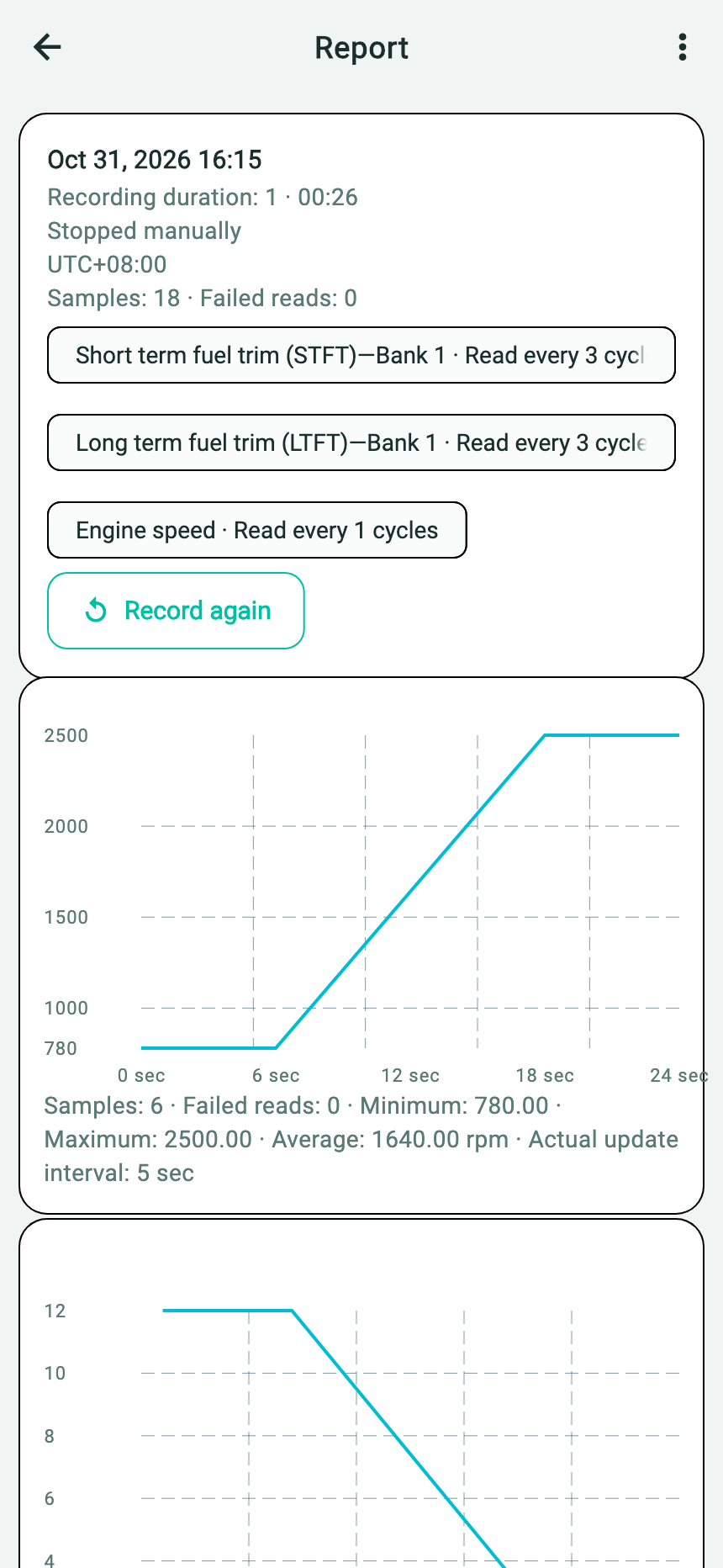
- Read the Bank 1 STFT and LTFT series alongside the separate “Engine speed” series.
- Use CSV times 0–8 s and 18–26 s to identify the two held conditions described above.
- The report itself does not name a cause or a repair outcome.
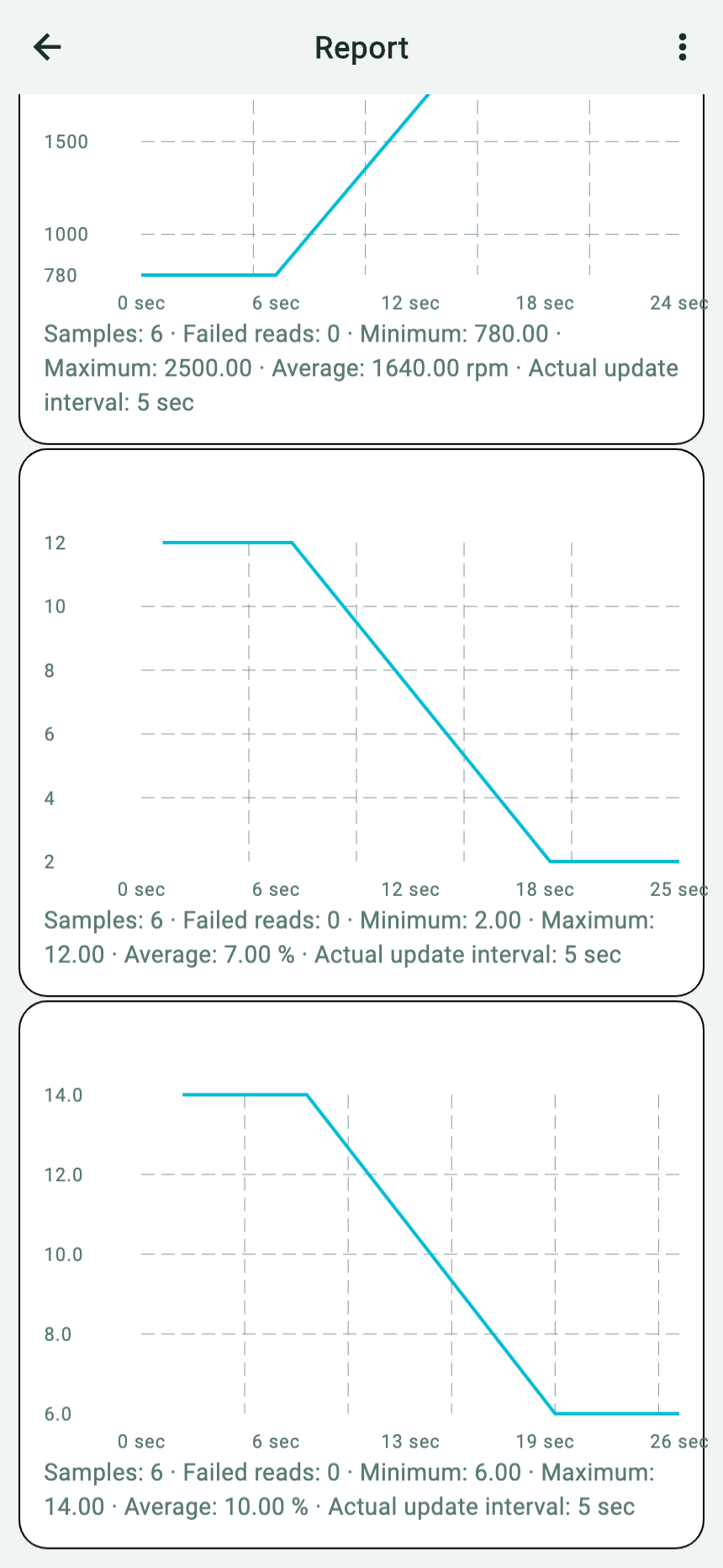
- The upper full curve is Bank 1 STFT: +12% in the first window and +2% in the later window.
- The lower full curve is Bank 1 LTFT: +14% followed by +6%. Use its individual CSV timestamps when comparing it with STFT.
- The plotted line joins recorded observations; the interval from 8 to 18 seconds does not show a measured transition.
Download the native English App CSV · demonstration data
Read the exported elapsed time and App measurement labels together. RPM and trim responses are separate sequential requests, not synchronized measurements. Keep any missing result status as shown instead of treating it as zero. Each curve connects its own recorded observations across the unsampled interval. The CSV contains no observations between 8 and 18 seconds; connecting lines do not show a measured transition.
Set up your own recording
Park safely and preserve any relevant stored and pending codes and freeze-frame information. Sign in, connect a compatible BLE adapter, and open Sensor Data Recording. After the support check, select the two Bank 1 trim items and “Engine speed” if all are listed. Choose a duration and interval, start the session, then select “Stop and create report” after collecting the observations. Open the History clock icon and select the saved entry to view its chart. The three-dot menu includes “Save Report Image” and “Export CSV.” The App polls sensors in sequence, not simultaneously; use elapsed times rather than treating each reading as same-instant evidence.
If the vehicle has a second bank and its PIDs are supported, include Bank 2 STFT and LTFT when you need to compare banks. Record engine temperature, open- or closed-loop status when available, engine speed, load, symptom timing and gaps. Keep the code snapshot and CSV together for a technician who can consult vehicle-specific service information and choose any necessary physical tests.
Choose the next evidence by the pattern
| What the trim record shows | What it supports | Useful next step |
|---|---|---|
| Correction is higher at idle and lower in a later condition | The pattern changes with the recorded condition. It can guide a focused check, but it does not locate a leak or identify a part. | Verify comparable temperatures, control mode and load; check the OEM procedure and retain codes/freeze-frame data. |
| Correction remains similar in both conditions | The brief comparison did not show a large condition-dependent change. A short log still cannot exclude a problem. | Review repeatability, supported sensors and symptoms; ask a technician which vehicle-specific test can distinguish the next possibilities. |
| One bank is higher in the same window | A repeatable difference gives the technician a bank to investigate first. | Verify the bank labels and operating conditions, then pair the readings with each code's reported status. |
| A trim PID is missing or unavailable | There is no usable percentage for that measurement. | Keep its status in the report and base the comparison on the values the vehicle returned. |
Positive correction at idle can be compatible with more than one system or operating factor. Service information may direct a technician to investigate air metering, intake/exhaust leakage, fuel delivery or sensor response under specific conditions. For vehicles covered by Ford TSB 04-17-4, unmetered air can make up a larger share of total airflow at idle than at higher airflow, so the technician compares operating conditions. This mechanism explains a test choice; it does not prove a leak from a trim graph. Preserve codes, freeze-frame and temperature/operating context for a professional. The bulletin applies only to listed vehicles and codes and is technician guidance, not a general 2,500-rpm DIY procedure or threshold for all cars.
PID Tracking supplies a report image and CSV. It does not copy a fuel-trim-specific preset question to an external AI. If you share the CSV, you can add your own question asking it to separate same-bank observations from hypotheses, identify missing context and state what OEM data is needed. Review the generated answer; do not rely on it to select a replacement part.
Sources and scope
- California ARB §1968.1 passenger-car and light-duty OBD terminology — terminology for feedback fuel corrections; not a vehicle-specific repair threshold.
- U.S. EPA OBD data collection appendix — lists trim and engine signals by bank when available; it is not a guarantee every App or vehicle supports each PID.
- Ford TSB 04-17-4 — a manufacturer procedure for its specified model years and codes, not a universal test.
- OBD CAN Live Data and Data Logging explain current readings and saved sequences.
Vehicle-specific service information takes priority. No universal positive-trim pass/fail number is asserted here.