P0420 Code: What to Check Before Clearing It
P0420 means the vehicle detected catalyst system efficiency below its threshold on Bank 1. Before clearing codes, save where P0420 appears, whether the Catalyst monitor has completed, and the matching Bank 1 Mode 06 result if available. These three records help you decide which test to repeat or what to ask a technician to verify.
OBD CAN team · Updated
Save the code categories before clearing
Park safely and follow the vehicle’s instructions for scanning. If you’re using OBD CAN, sign in, connect a compatible BLE OBD2 adapter, and start the read in OBD2 Diagnosis.
Get OBD CAN for iOS or Android
Check Confirmed, Pending, and Permanent. Save each category that contains P0420 and any companion codes from the same scan. Record when you scanned and what the check engine light was doing. If the scan was interrupted or a result was unavailable, keep that information with the report.
Write down the warning-light behavior you saw, when it happened, any recent clearing or service, and the vehicle’s year, model and engine. In History, open the saved report and use More Options and “Copy AI Prompt Template” to preserve the available codes in text. Keep your observations with that text.
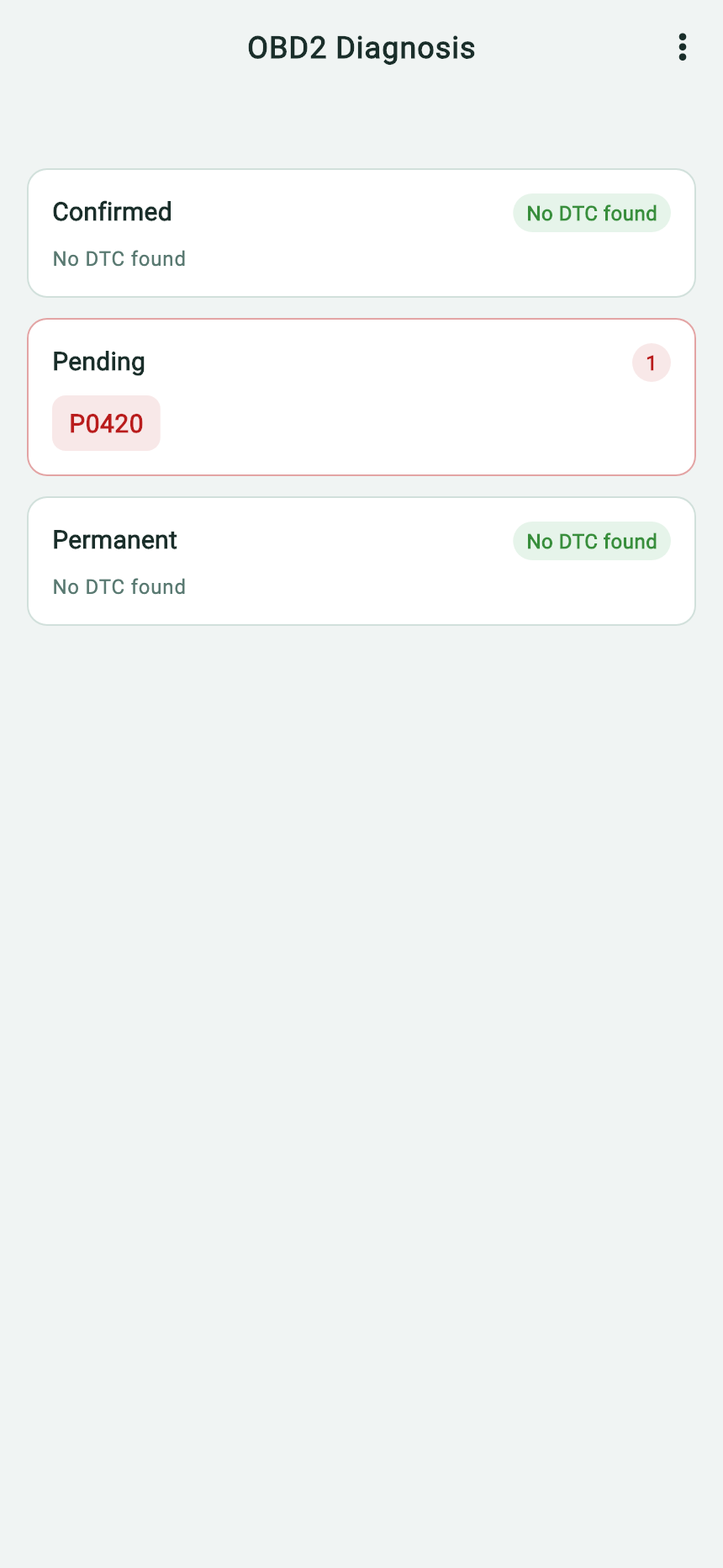
- Save P0420 together with the Pending label.
- Confirmed shows no code in this example. Preserve all categories in your own report.
Save the Catalyst readiness period
“Monitor Status” → Start. Check the Catalyst row under Since DTC cleared. If the vehicle also returns Current drive cycle, save it with its own period label. A later comparison makes sense only between the same monitor and the same reporting period.
Ready means the self-test completed for the displayed period. Not ready means no completed readiness result for that period. Save Not supported or an unavailable response as shown. The catalyst readiness guide explains these states and the separate Heated catalyst row.
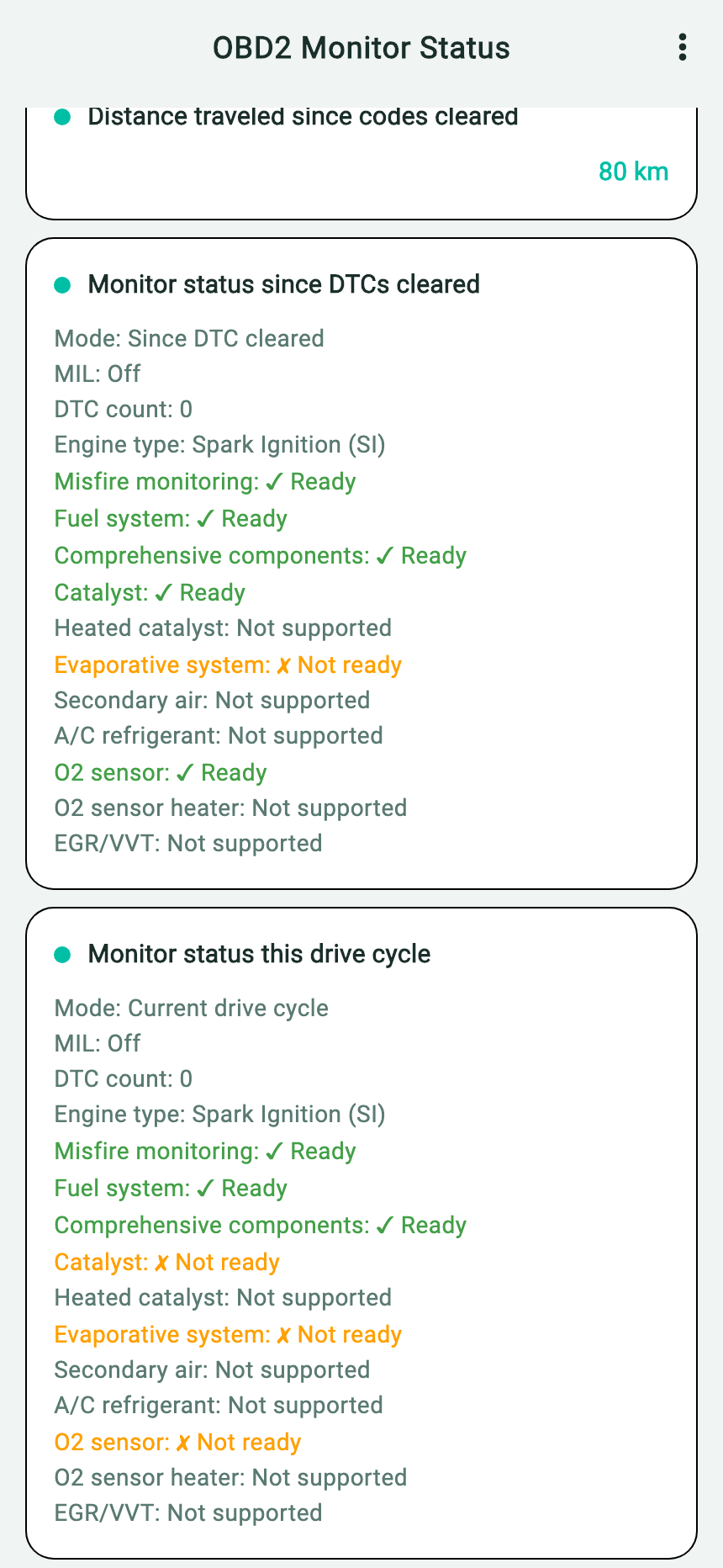
- Keep the Since DTC cleared period label with the result.
- In this example, Catalyst shows Ready. Use the Mode 06 report for the value and the test limits.
Match the Bank 1 Mode 06 test
Non-Cont. Monitor (Mode 06) → Start. In OBD CAN, both Monitor Status and Mode 06 require sign-in, paid membership, and a supported vehicle connection. When results are available, save the Bank 1 catalyst monitor heading, the row identifiers, the returned value, the limits, the status, and the time you read them.
Match the monitor and test to service information for your exact vehicle before interpreting the row. For example, Ford lists Monitor ID 0x21 and Test ID 0x81 for Bank 1 oxygen storage capacity in the catalyst tests described in its 2020–2023 gasoline OBD documentation. Check the units and scaling for the applicable test. Ford OBD System Operation Summary
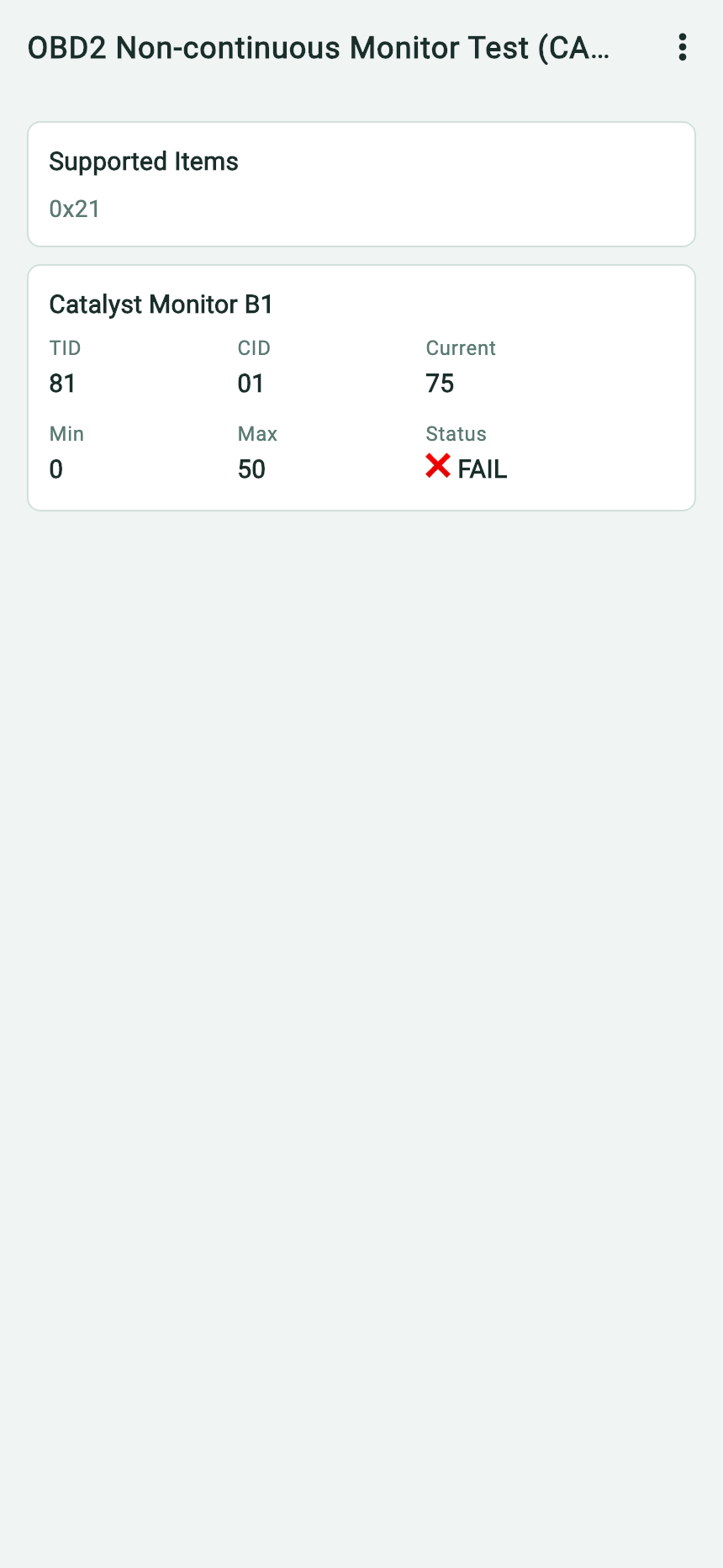
- Start with Catalyst Monitor B1 so you keep the Bank 1 context.
- Keep the identifier as displayed, TID 81, and save the rest of the row with it.
- Current 75 is the raw value returned in this example.
- The displayed Max is 50. The app marks this row FAIL because 75 is above that limit.
Download the original English Mode 06 report
The app screenshots illustrate separate reports.
Mode 06 can show a retained value from a monitor’s earlier run. The date you scanned it establishes when you read the value. Live oxygen sensor waveforms are separate observations that can be saved with their operating conditions.
Choose the next check from your results
| What your reports show | What to do next |
|---|---|
| Catalyst is Not ready in the relevant period, for example after a recent reset. | Save the current report and record the known reset or service. Check the manufacturer’s conditions for running the monitor. When those conditions can safely be met, compare the same period in a later read. |
| The expected row is missing, its definition is uncertain, or its test run is unknown. | Save the available results and note the gap. Ask a technician to verify vehicle coverage, check the test definition, or confirm that the monitor has run again. |
| The correct Bank 1 test is outside its documented limits. | Keep the full row, readiness report, and companion codes. Ask the technician which checks in the manufacturer’s procedure apply before deciding on parts. |
| A comparable test is within limits and P0420 appears only as Permanent. | Keep the latest report and compare it with any pre-repair record using the permanent-code recheck guide. If Pending or Confirmed returns, bring both reports for diagnosis. |
| A value is within limits while P0420 is Pending or Confirmed. | Save both results. Verify that you used the correct bank and comparable reading periods, and ask whether the value could be retained from a different test run. |
Send the three reports together with the vehicle’s year, make, model, and engine. Include scan times, the dashboard light you observed, and any known reset or repair. Use More Options → Copy AI Prompt Template in each available result to keep its native text. For a follow-up, ask which check would resolve the specific gap in your records.
What a published before-and-after comparison shows
Bob Pattengale documented a 1999 Toyota Tacoma using a separate scan tool. The Bank 1 test value fell from 0.994 to 0.604. Both readings exceeded the 0.499 limit for that test. Figure 5 shows the warning light off, P0420 pending, and the Catalyst and EVAP monitors still incomplete after a reset. At a later check in Figure 6, the test was within limits, the monitors had completed, and no pending codes remained. MOTOR, March 2007, Figures 5 and 6
For your own recheck, compare the same verified test, its limit, the readiness period, and the code categories. Use the vehicle’s own service information for the applicable limits and conditions.